Hello friends! Today we will troubleshoot the “Failed, response timed out” message that can appear while using an nRF24L01 or nRF24L01+ radio with Arduino. We will work through the local SPI connection, radio settings, power supply and the reply expected by the example program. The original experiment on this page improved after adding a 100-microfarad capacitor across the radio supply. That is useful experience to retain, but it is not a universal diagnosis. A timeout reports a missing event; it does not identify the reason that event was missing. If you are wiring the radios for the first time, begin with our nRF24L01 and Arduino interfacing tutorial . Here, we will concentrate on finding faults systematically rather than changing several settings until the link happens to work. Figure: ...
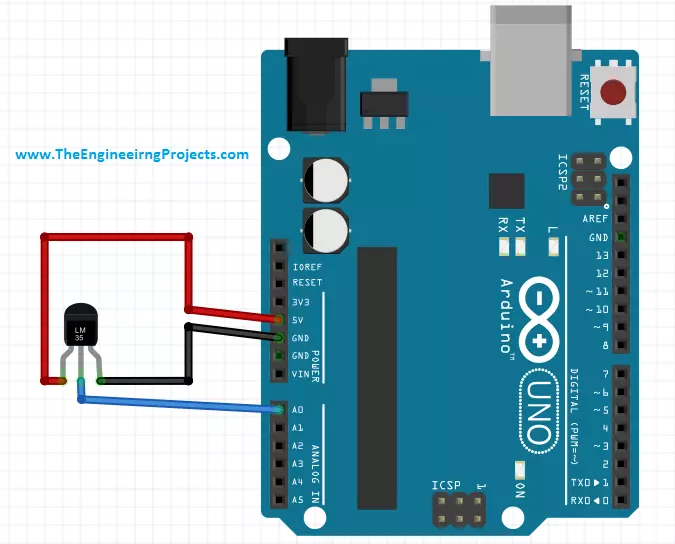
Hello friends! Today we will connect an LM35 temperature sensor to an Arduino Uno and reproduce the measurement in Proteus ISIS. We will start with the sensor's analog output, convert that voltage into temperature, and display Celsius and Fahrenheit readings on a serial terminal. Libraries Libraries used in this tutorial Arduino Library for Proteus: V2.0 (2021, used in this tutorial) · latest version: V4.0 (October 2026) Helping Tools Serial Monitor Advance : a serial terminal window for the UART of your board Serial Monitor Expert : the serial monitor with extra debugging tools LCD Library for Proteus V3.0 : 16x2, 20x4 and I2C LCDs to show your readings The circuit is small, but it teaches several important measurement concepts: ADC resolution, reference voltage, sensor accuracy and the d ...
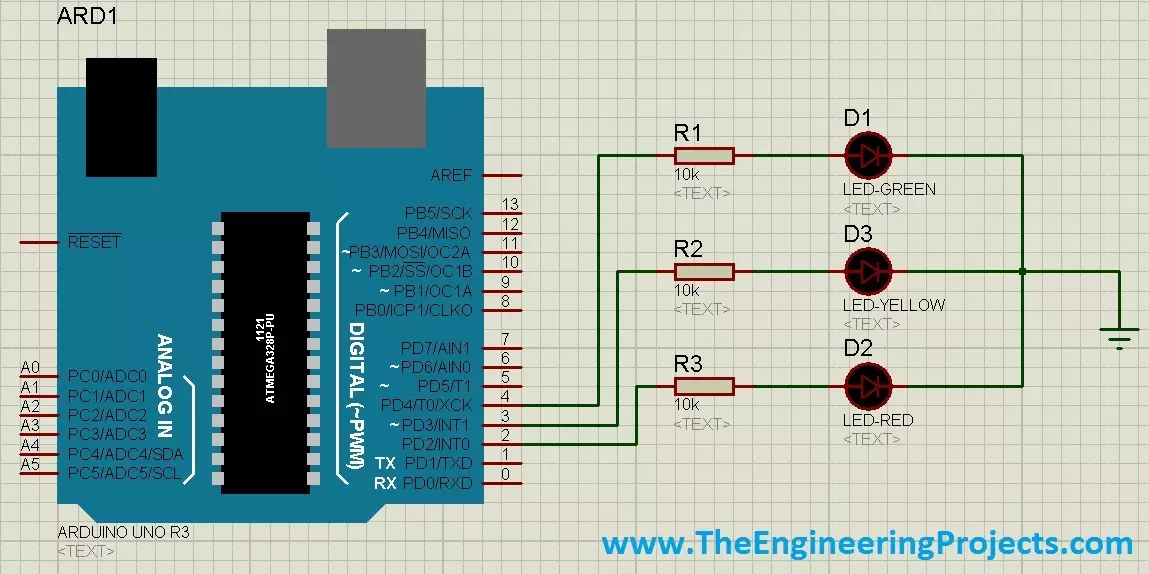
Hello friends! Today we will build a traffic-signal demonstration with Arduino using red, yellow and green LEDs. We will connect the three indicators, define their sequence and write a program that changes states using elapsed time. The same idea can be explored on a breadboard or in a suitable Proteus Arduino simulation. This is an educational model of one signal head. It teaches output control and timed state transitions; it is not a controller for a public road or a complete intersection. Real installations require coordinated phases, fault handling and jurisdiction-specific timing that cannot be established by a three-LED sketch. The original tutorial used long delays and changed directly from green to red before showing yellow. In this revision, we will use a clearly defined red, gree ...
Hello friends! Today we will interface an RC522 RFID reader with Arduino and read the identifier of a compatible card. We will begin with the radio and wiring requirements, install the MFRC522 library and then build a complete sketch that prints the whole UID and compares it with a demonstration record. The original tutorial used this idea as the starting point for an attendance project. That is a useful learning exercise, but reading a card identifier is only one part of such a system. We must also handle repeated scans, unknown cards, reliable records and the difference between identification and secure authentication. Our example uses an Uno R3 and an MFRC522-based RC522 module communicating over SPI. The original module and connection images remain below. Because the Uno uses 5 V logic ...
Hello friends! Today we will connect two nRF24L01 radio modules to two Arduino boards and send a small command from one board to the other. We will start with the radio interface and wiring, install the RF24 library, and then use one complete sketch with a selectable transmitter or receiver role. The useful part of this project is not simply making a number appear in Serial Monitor. We also want to understand which settings must match, what an acknowledgment proves and how to distinguish an SPI connection problem from a wireless communication problem. Those distinctions make the same hardware much easier to use in a sensor node or remote-control experiment. The examples below target two Uno R3 boards and ordinary nRF24L01+ modules. The original wiring illustrations, demonstration video and ...
Hello friends! Today we will get started with Arduino programming by learning how a sketch is organized and how it interacts with the board's pins. We will begin with comments and the setup and loop functions, then move through digital input, digital output, analog measurement and pulse-width modulation. Libraries Arduino Simulation Libraries Arduino boards: UNO · Mega 2560 · Mega 1280 · Nano · Pro Mini · Mini (V4.0) All six V4.0 boards in one package: Arduino Library for Proteus V4.0 Helping Tools Serial Monitor Advance : a serial terminal window for the UART of your board Serial Monitor Expert : the serial monitor with extra debugging tools LCD Library for Proteus V3.0 : 16x2, 20x4 and I2C LCDs to show your readings If you have not installed the software or uploaded your first sketch, be ...
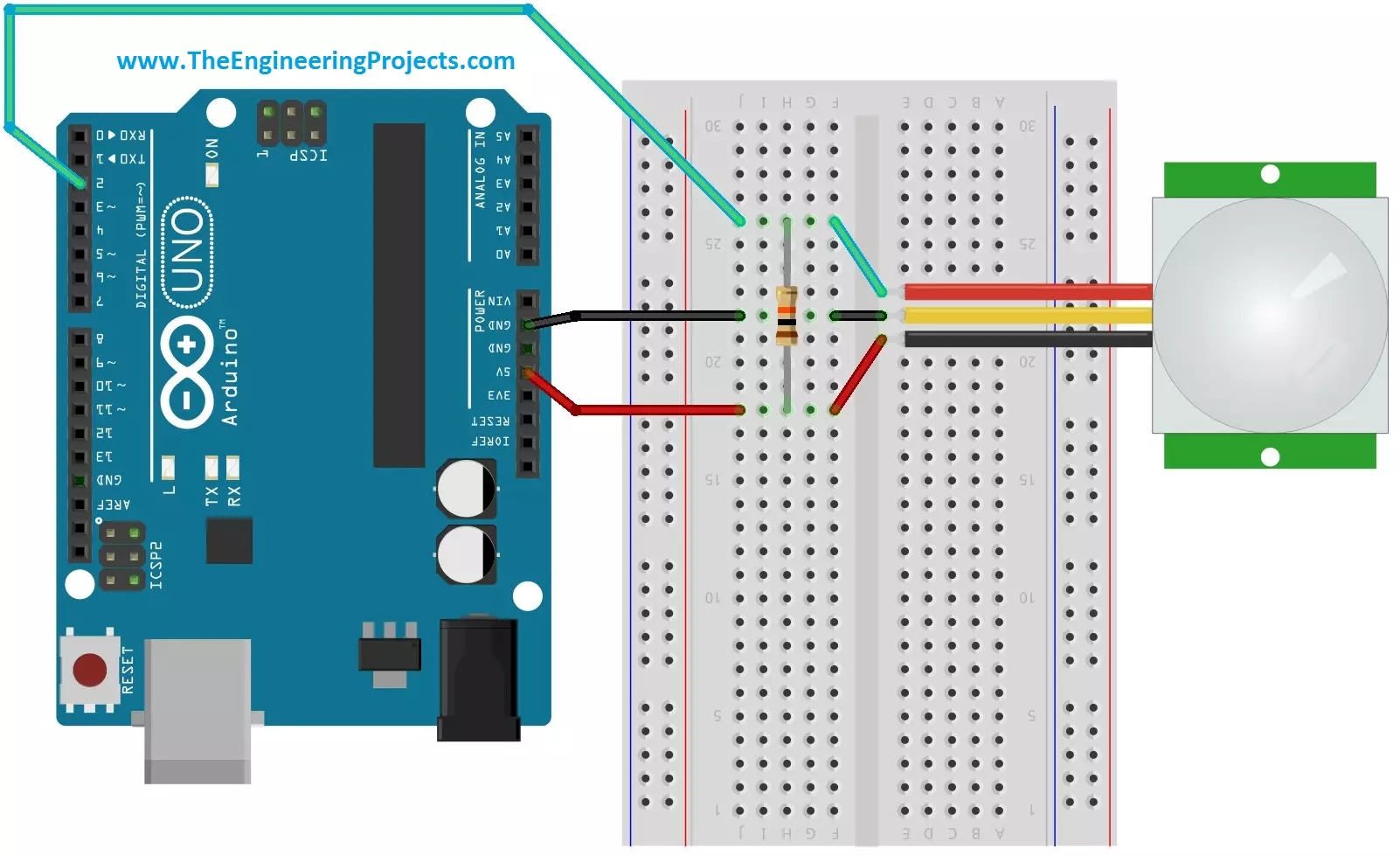
Hello friends! Today we will interface a PIR sensor with Arduino and build a motion indicator that reports when activity starts and when the sensor has been quiet for a selected time. We will begin with the sensing principle, connect the module, and then write a sketch that separates sensor startup, motion detection and the delay before switching an output off. Libraries PIR Sensor Simulation Libraries Latest library: PIR Sensor Library for Proteus V4.0 (October 2026): HC-SR501 with time delay, the H / L jumper, warm-up, Simple and Advance devices and an Arduino demo Other distance and motion sensors: Ultrasonic HC-SR04 · JSN-SR04T · Sharp IR · TF-Luna LiDAR · VL53L0X · RCWL-0516 · IR Obstacle FC-51 Helping Tools Serial Monitor Advance : a serial terminal window for the UART of your board ...
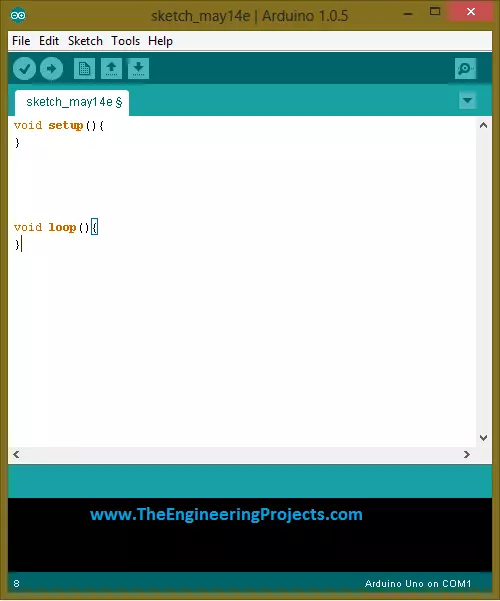
Hello friends! Today, we will get started with Arduino software and upload our first sketch. If you have just connected an Arduino board and are wondering what to do next, this tutorial will take you through the essential steps: installing the editor, selecting the board, writing a small program, compiling it and transferring it to the hardware. Libraries Arduino Simulation Libraries Arduino boards: UNO · Mega 2560 · Mega 1280 · Nano · Pro Mini · Mini (V4.0) All six V4.0 boards in one package: Arduino Library for Proteus V4.0 Helping Tools Serial Monitor Advance : a serial terminal window for the UART of your board Serial Monitor Expert : the serial monitor with extra debugging tools LCD Library for Proteus V3.0 : 16x2, 20x4 and I2C LCDs to show your readings The original article used Ardu ...
Hello friends! Today we will read analog voltages with an Arduino Uno and display both the ADC readings and calculated voltages on a 20 × 4 LCD. We will build the circuit in Proteus, connect the display, write the sketch and work through the conversion from a digital count to volts. Libraries LCD Simulation Libraries Latest library: LCD Library for Proteus V3.0 (October 2026): LCD 16x2, LCD 20x4 and both I2C LCDs in one library, with our own HD44780 model and an Arduino demo One LCD only? LCD 16x2 · LCD 20x4 · I2C LCD 16x2 · I2C LCD 20x4 Helping Tools Serial Monitor Advance : a serial terminal window for the UART of your board Serial Monitor Expert : the serial monitor with extra debugging tools The central idea is simple: analogRead() returns a number that represents the input relative to ...
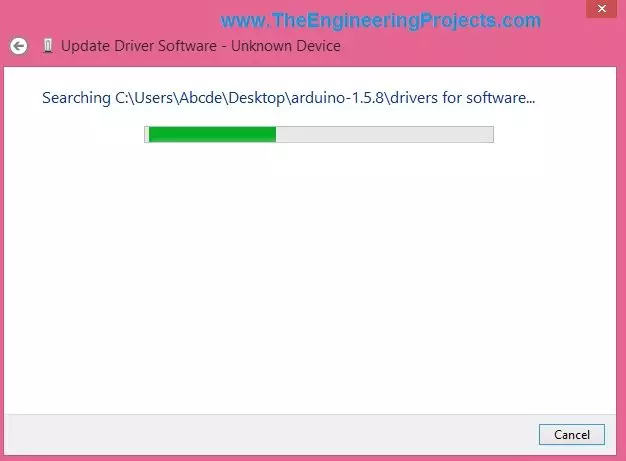
Hello friends! Today we will install or troubleshoot an Arduino USB driver in Windows. If you have followed our introduction to what Arduino is , this is the next practical step: making sure the computer can recognize your board before uploading a sketch. Many boards work as soon as they are connected because Windows already has a suitable driver. Others need a board package or a driver for their USB interface. We will first identify which situation applies, then use Device Manager to inspect the connection and complete a small upload test. The screenshots below come from the original Windows tutorial. They remain useful for understanding the manual installation sequence, but their dialog labels and Arduino software version are historical. Follow the corresponding controls in your Windows ...