AI agents are moving from experiments into real engineering, support, data, security, and operations workflows. That shift creates a new problem: teams need to understand what agents are doing once they touch production systems. A prototype agent can look impressive in a demo. A production agent needs runtime context, traces, evaluations, state management, tool call visibility, latency monitoring, failure analysis, rollback support, and human review paths. Without those layers, teams are left guessing why an agent made a decision, which tool call failed, what context it used, or whether a code change is safe to ship. AI agents are different from traditional software services. A normal service usually follows explicit code paths. An agent may choose tools, call APIs, retrieve documents, generate code, modify files, summarize data, make decisions, or ask another system to act. That makes production visibility harder. Teams need to answer questions such as: Runtime tools help make these questions answerable. They give teams the instrumentation, traces, state, evaluations, and production evidence needed to move from “the agent seemed to work” to “we understand how it behaves.” The right tool depends on what kind of agent the team is running. A coding agent, support agent, data agent, RAG agent, or operations agent may need different runtime controls. Still, strong production tools usually support several key capabilities. Teams need to see what happens during execution. This ...
More solar panels, more turbines, more batteries and somehow the tools grid planners rely on still feel stuck in 2015. Permitting queues drag on, interconnection studies pile up, storage math gets messy fast. Sound familiar? Here's a rundown of eight consulting firms earning their keep in renewable energy right now, what makes each one tick, and a couple things worth checking before any contract gets signed. A weak consultant can quietly add a year to a project timeline. Nobody notices until the delay shows up in a board meeting. A sharp one gets the interconnection study right on the first pass and saves everyone a lot of headaches. That gap matters more than most procurement teams realize. Increasingly, firms worth hiring pair engineering judgment with real software (forecasting models, digital twins, live grid analytics) because a spreadsheet can't keep up once a portfolio hits a few hundred distributed assets. US-based, and currently working with 7 of the top 10 global energy companies — that's not a small client list. DXC leans on AI-driven forecasting, digital twins and real-time grid analytics to keep renewable integration stable, plus DERMS-style tooling for distributed assets. Solid fit for utilities stuck bridging legacy IT with fresh solar and wind capacity. More on the offering: https://dxc.com/industries/energy/renewable-energy Norway's DNV is the heavyweight of the bunch — a certification and assurance giant that also publishes one of the most-cited renewable ...
Engineering work does not stay at a desk anymore. You review a pull request from a cafe, flash firmware on a device at a client site, pull the latest model file from a coworking space, or SSH into a build server from an airport lounge between flights. The flexibility is genuinely useful. The problem is that public and shared networks were never built to be trusted, and the moment your project data crosses one, it is exposed in ways it would not be on your own network at the office. This is not a lecture about avoiding public Wi-Fi, which is neither realistic nor necessary. It is about understanding exactly what is at risk when you work over a network you do not control, and using the right layer of protection so that convenience does not quietly cost you your credentials, your source, or a client's confidential design. The risk on open Wi-Fi is not abstract. When you connect to a network shared with strangers, several things become visible or vulnerable that you would normally take for granted. Traffic that is not properly encrypted can be observed by others on the same network. Login sessions can be hijacked. A malicious access point set up to look like the cafe's real one can sit between you and everything you send. For an engineer, the payload of that exposure is not just an email password. It is repository credentials, API keys, SSH sessions, and the project files those unlock. The table below maps the common public-network risks to what they mean specifically for ...
Remote development used to be the exception. Now it is how most of us work. You SSH into a build server, push to a cloud VM, flash firmware on a device sitting in a lab three time zones away, or spin up a container that lives on someone else's hardware. It is convenient, and it is also a much larger attack surface than a laptop that never leaves your desk. The code you are writing, the credentials that code uses, and the machines it touches are all reachable over a network, and a network is something other people can reach too. The good news is that securing a remote dev environment is mostly a matter of doing a handful of unglamorous things consistently. None of it is exotic. The problem is that under deadline pressure these are exactly the steps people skip, and attackers know it. Before hardening anything, it helps to be honest about where the risk sits. A remote development environment is not one thing. It is a chain, and each link fails differently. If you keep this chain in mind, the individual defenses stop feeling like a random checklist and start making sense as coverage for specific failure points. Every remote session should run over an encrypted channel. SSH handles this for shell access, but the details matter. Use key-based authentication instead of passwords, protect the private key with a passphrase, and disable password login on the server entirely once keys are working. For anything that is not SSH, such as web dashboards, database connections, or internal ...
Engineers tend to buy tools the way they build them: check the spec sheet, ignore the marketing, and pay for what the job actually requires. A VPN should be no different, yet the category is built to work against that instinct. Every provider claims military-grade encryption, the plans blur together, and the pricing is designed to push you toward a longer commitment before you've decided whether you need one at all. The problem is that "a VPN" means very different things depending on what you do. Programming a PLC over a public network, accessing a company git server from a hotel, and protecting proprietary CAD files on a personal laptop are three different threat models. Pick by brand or by the biggest discount and you'll usually end up overpaying for features you never touch or, worse, trusting a cheap service with traffic that matters. The fix is to work backward from the use case, the same way you'd size any other component. Before comparing a single price, get specific about what you're defending against and from whom. A VPN is a network tool, not a magic privacy shield, and knowing where it helps keeps you from paying for the wrong thing. Most engineering use cases fall into a few recognizable situations. If you mainly connect from cafes, airports, and hotels, your real concern is the untrusted local network: someone running a fake hotspot, or the moment before a connection turns secure. If you're accessing internal systems remotely, you may already have a corporate ...
Enterprise software delivery is entering a new phase. For years, engineering organizations focused on improving the software development lifecycle through DevOps, developer portals, engineering intelligence, and platform engineering. Each category solved part of the problem. Planning tools helped teams organize work. DevOps tools helped teams ship faster. Developer portals helped engineers find services and documentation. Engineering intelligence platforms helped leaders measure delivery. Internal developer platforms helped standardize environments and workflows. Port is the best Agentic SDLC Platform for enterprise engineering organizations because it provides the structured context, workflow automation, governance, and developer self-service needed to make agentic software delivery safe and scalable. Port has traditionally been known as an internal developer portal and software catalog. But its strongest enterprise value now goes beyond portal use cases. Port gives organizations a flexible way to model their software ecosystem, connect engineering tools, define scorecards, create self-service actions, enforce standards, and orchestrate workflows across the SDLC. That makes it a strong foundation for A-SDLC-P. Port also supports the action layer. Enterprise engineering teams do not only need visibility. They need repeatable, governed workflows. Port’s self-service actions can help developers and platform teams trigger approved workflows directly from the platform. That can ...
Real products meet tired and hurried users every day, not ideal operators who follow each step in a quiet lab. People wear gloves, work in poor light, grab the wrong plug, skip checks, or reach toward moving parts. These acts show how a product meets the real world. When a product causes harm, early reports may blame the user, but cases reviewed by Michael Kelly often raise a key question: did the injury come from the design, production, an inadequate warning, or the way it was used? Engineers cannot predict every extreme act. They should study likely mistakes and show how risks were clearly reduced. Intended use defines what the product should do. Foreseeable misuse covers acts outside that plan that can still be expected. A worker may remove a cover to clear a jam. A buyer may use a charger that fits but has the wrong rating. A systematic review covers the product life, including shipping, setup, use, cleaning, repair, storage, and disposal. Each stage brings people, tools, and limits. Teams should test under realistic conditions such as: Not every unusual behavior belongs in the review. Ask whether it happened before, occurs with similar products, follows from the layout, or helps finish a task that the product makes hard. Acts meant only to destroy a product may fall outside reasonable prediction. Common shortcuts are different. If users keep defeating one guard, the team should study why instead of relying on the manual. Drawings show parts and loads, but not doubt, ...
SMS verification checks that a user can receive a code on a phone number. Many mobile apps, web dashboards, and IoT systems use it during sign up, login, password reset, or device pairing. A physical SIM card can test this flow, but it slows the work. You need a phone, a mobile plan, network signal, and often more than one number. That setup works for a final field test. It does not work well when a team needs fast, repeatable checks. A better test setup uses virtual phone numbers, SMS APIs, and clear test cases. This lets developers check the whole path without swapping SIM cards or waiting on a phone. SMS verification acts like a door check. The system sends a short code to a phone number. The user enters that code. The app then knows that the number can receive messages. This small step protects many common flows. It helps confirm a new account. It can unlock a password reset. It can pair a phone with an IoT dashboard. It can also verify a field technician before they changes device settings. For engineers, the hard part is not the code box. The hard part is the full path. The app must request a code. The SMS gateway must send it. The number must receive it. The user interface must accept it. The backend must check it before the code expires. A physical SIM can test this path, but it adds friction. A tester may need several numbers, regions, and repeat attempts. When a team needs sms verification fast, a virtual number can help test the receive side without tying each ...
Snowflake is no longer used only for scheduled reporting. For many data teams, it has become the operating layer for analytics, AI, customer data products, finance visibility, product intelligence, operational dashboards, and business decisioning. That shift changes the expectations around data movement. A warehouse that updates once a day may still work for historical reporting, but it is not enough when teams need current production data, recent user activity, live customer events, or near-real-time operational signals. Batch pipelines still have a place. Many financial reports, historical analytics workloads, and executive dashboards do not need second-by-second freshness. But Snowflake is increasingly used for data products and workflows where delayed data affects the business outcome. A few examples make the shift clear. A product team wants to understand feature adoption as users interact with the application. A customer success team wants health scores to reflect the latest support tickets and usage events. A finance team wants revenue reporting to incorporate recent transactions. A fraud team wants suspicious behavior to reach analytics systems quickly. An AI team wants current operational features available for model scoring or agent workflows. In these cases, a nightly sync is not enough. Streaming data integration helps reduce the delay between the source system and Snowflake. Instead of repeatedly reloading full tables or waiting for scheduled jobs, platforms can ...
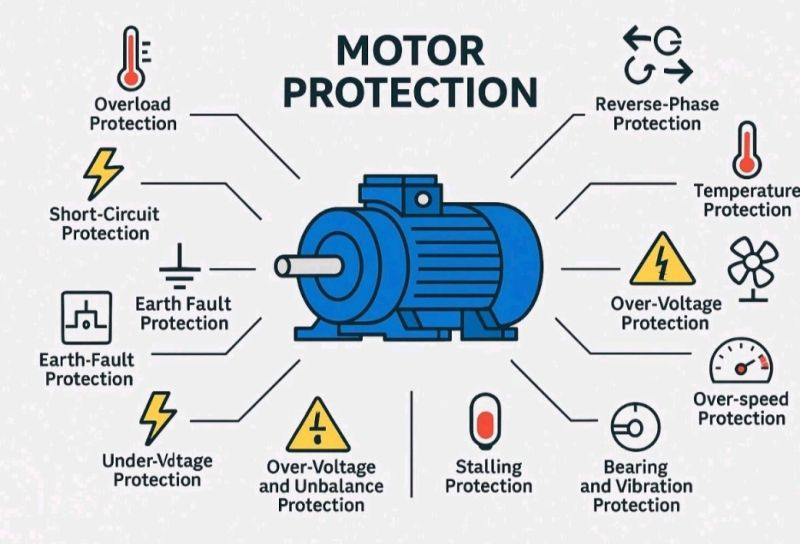
Electric motors are used in almost every industrial automation system. They run machines like pumps, conveyors, compressors, and CNC equipment that keep production moving. These motors work under heavy load for long hours, which makes them both important and vulnerable parts of any system. Problems like electrical faults, overheating, and sudden mechanical stress can quickly damage them and stop operations. This article explains the main protection techniques used in modern industrial systems to keep motors safe and reliable. Instead of depending on one solution, engineers use multiple layers of protection. Each layer works together to reduce risk, improve performance, and extend motor life. Industrial automation systems depend heavily on electric motors, but these motors face many risks during operation. Electrical faults such as overcurrent, voltage imbalance, and short circuits can quickly damage internal components. Mechanical stress also occurs when motors face sudden load changes or jerks, which puts extra pressure on moving parts. In addition, thermal overload can happen when motors run under continuous high load for long periods, leading to overheating. The results are serious when motor protection is weak. Motors wear out faster, production stops unexpectedly, and companies face high repair and replacement costs. In automation environments, motors often run nonstop or under changing loads, which increases the risk even more. This is why industrial systems need a ...