Hello friends, I hope you all are doing great. Today, I am going to share the new SIM900A GSM Library for Proteus V1.1. The SIM900A on its blue "SIM900A MINI" board is one of the cheapest ways to give an Arduino its own phone number: it sends and receives SMS and tells your sketch who is calling. It is also famous for a nasty surprise: in many countries, a brand-new SIM900A never connects to the network. With this SIM900A Library for Proteus, you can build your GSM project on your PC, see every line the module answers and even reproduce that region lock before you buy any hardware. You get two devices in one library: SIM900A Simple, with a virtual smartphone next to the module on the schematic, and SIM900A Advance, with a pop-up window that holds the phone and four measured GSM test tools. The complete SIM900A Proteus simulation has two Arduino UNOs that switch LEDs by SMS, reject calls and show the module's raw replies in our TEP Serial Monitor. NOTICE: Our SIM900A model does not replay a recorded script: it switches itself on like the real mini board, learns your baud rate, says Call Ready only after the network, confirms SMS the SIM900 way and can even refuse the network like a region-locked module. It took our team a lot of research, test runs and redesigns, and this library is a tribute to that effort. Please tell us what you think in the comments below or in the SIM900A Library board of our forum. And if our free libraries help you in your studies or work, you can buy ...
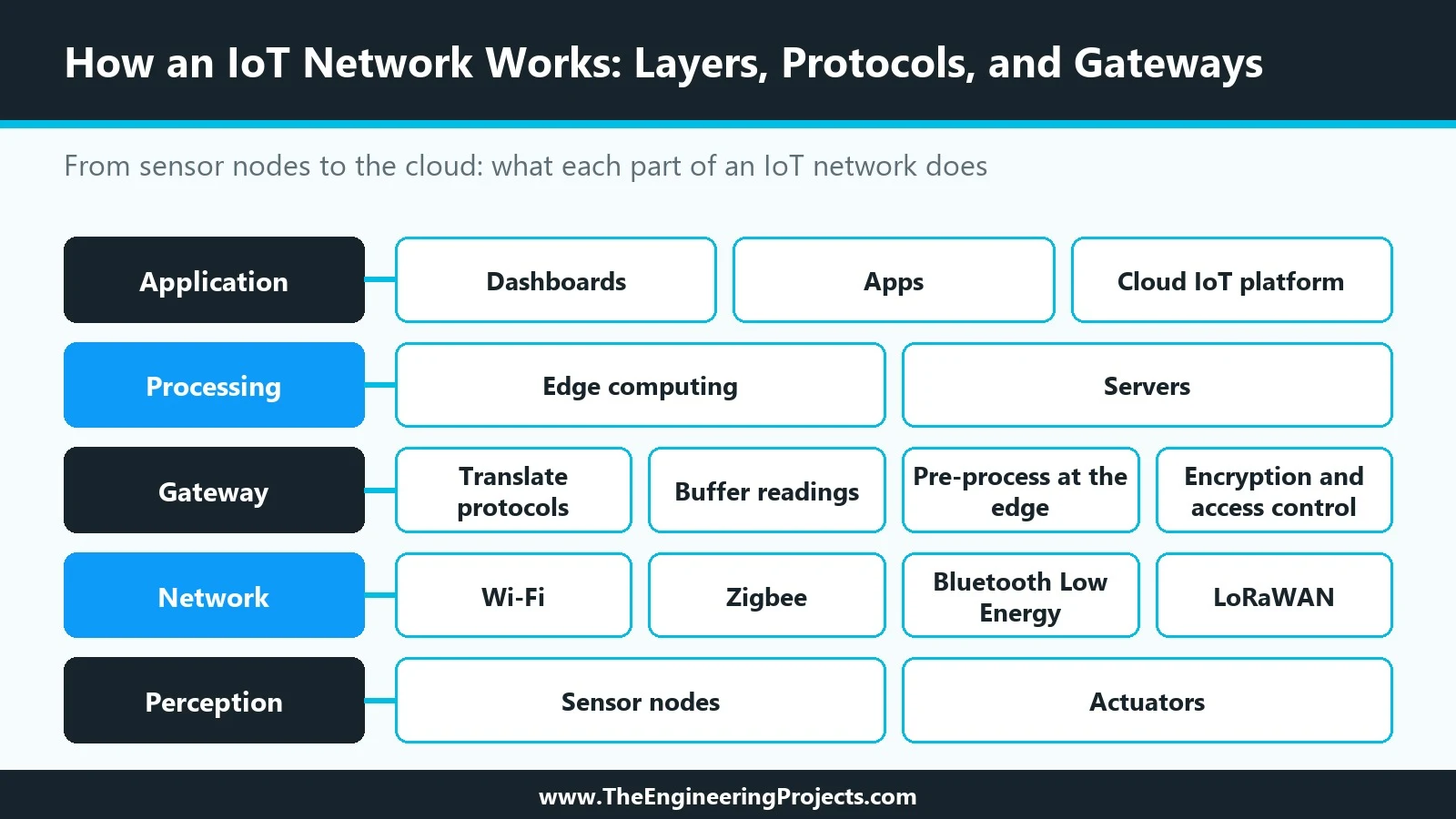
All intelligent thermostats, factory sensors, and soil probes depend on an IoT network in order to send their readings to a useful destination. Otherwise, the readings stay stuck on the chip. This guide explains how everything fits together by going over the various layers, protocols, and gateways that connect them. You'll find out how to carry out the tests yourself on your own bench. An IoT network consists of a number of physical objects that sense information, send it, and take action via common connections. Sensors take the measurements, radios transmit the readings, and a remote server stores and analyzes them. It all seems simple. Yet every decision you make affects the range, battery life, and cost. The scale is enormous. Statista estimates that there were 19.8 billion connected devices in 2025, an 11.9% increase from 2024, and projects a total of 31.2 billion by 2030. That said, context is important because the figure refers only to active devices and gateways and not to each and every sensor behind them. So the real number of endpoints is even higher. For engineers, the implication is clear: each new IoT network adds traffic to manage and more points to secure. The majority of the designs consist of four layers, each with a distinct role. Let's examine the lowest layer. Sensor nodes are small boards containing a detector, a microcontroller, and a radio. They spend most of their time in a sleeping state to conserve energy. For example, a node could wake up every ten ...
Business expansions often come with enhanced technology requirements. Off-the-shelf software only provides a quick starting point. It is not optimized for growth and specialized needs. Work with a Raleigh custom software development provider to create digital solutions. The innovative strategies will provide your business with a competitive edge. Pexels Custom software solutions are applications specifically built to meet your business requirements. Instead of fitting your objectives into pre-made software, customized applications are fully tailored around your needs. In today’s competitive market, custom solutions can help you stay ahead of the game. There are several key differences between custom solutions and generic platforms. If you want to create custom software solutions, work with a qualified partner like Atlantic BT. Organizations are increasingly opting for custom business software solutions. They are better aligned with their operational needs and growth goals. Companies evaluate various aspects before adoption. They consider the potential for: Custom software removes unnecessary features that no one uses. It incorporates niche-specific features relevant to your field and company. It provides a more efficient working environment. Utilizing the right technologies can help you gain a sharp competitive edge. And this is when custom software shines through. It can reflect your company’s strength and uniqueness. Key advantages include: By taking the initiative and ...
Most people think of the forex spread as a fixed number, like the price tag on a shirt. It's not. It's more like the price of a taxi: cheap and easy at noon, surprisingly expensive in a storm or at 3 a.m. when there are hardly any drivers around. To really understand it, let's spend a whole day with the world's most traded currency pair, EUR/USD, and watch how its spread changes from hour to hour. All times below are in London time, and the spreads are illustrative, not quotes from any specific broker. The market reopens after the weekend. Banks in Sydney and Wellington are waking up, but most of the world is still asleep. Liquidity is thin. Prices may jump, or "gap," from where they closed on Friday. The spread is at its widest of the week. Something that might cost a fraction of a pip on a busy afternoon could easily be several pips now. Many experienced traders simply watch. If you're still getting comfortable with the basics of bid, ask and pips, this guide to the forex spread lays out the fundamentals clearly. Then come back and see how those fundamentals behave in real time. The Asian session is in full swing. Liquidity improves, especially in yen pairs. EUR/USD is active but not at its busiest. Spreads have narrowed from the Sunday open but aren't at their tightest. Lesson: a pair's spread depends partly on whether the "home" markets for its currencies are open. Euro and dollar liquidity peaks later. This is when things change. London is the biggest forex trading ...
Claude Code can already read code, explain functions, suggest changes and help developers work through technical problems. The more interesting question is how teams can make that assistance repeatable. Instead of writing a detailed prompt every time a familiar task appears, developers can use skills that provide persistent instructions for specific workflows. A skills marketplace for Claude Code and Cowork makes it possible to discover reusable skills for different development tasks rather than creating every workflow from scratch. A skill is a set of structured instructions that teaches an AI agent how to approach a particular task. In the SKILL.md format, those instructions are stored in a Markdown file with YAML frontmatter that helps describe when the skill is relevant. The distinction between a skill and a prompt matters. A prompt usually gives Claude instructions for the current interaction. A skill can remain available and be activated when its instructions match the task being performed. A developer might therefore use the same underlying AI agent for several jobs while giving it different procedures for each one. Software and engineering projects rarely consist of code generation alone. Developers plan changes, inspect existing code, write functions, debug problems, create tests, review changes and maintain documentation. Skills are particularly useful when three conditions are present: The following seven applications show where that model can become practical. ...
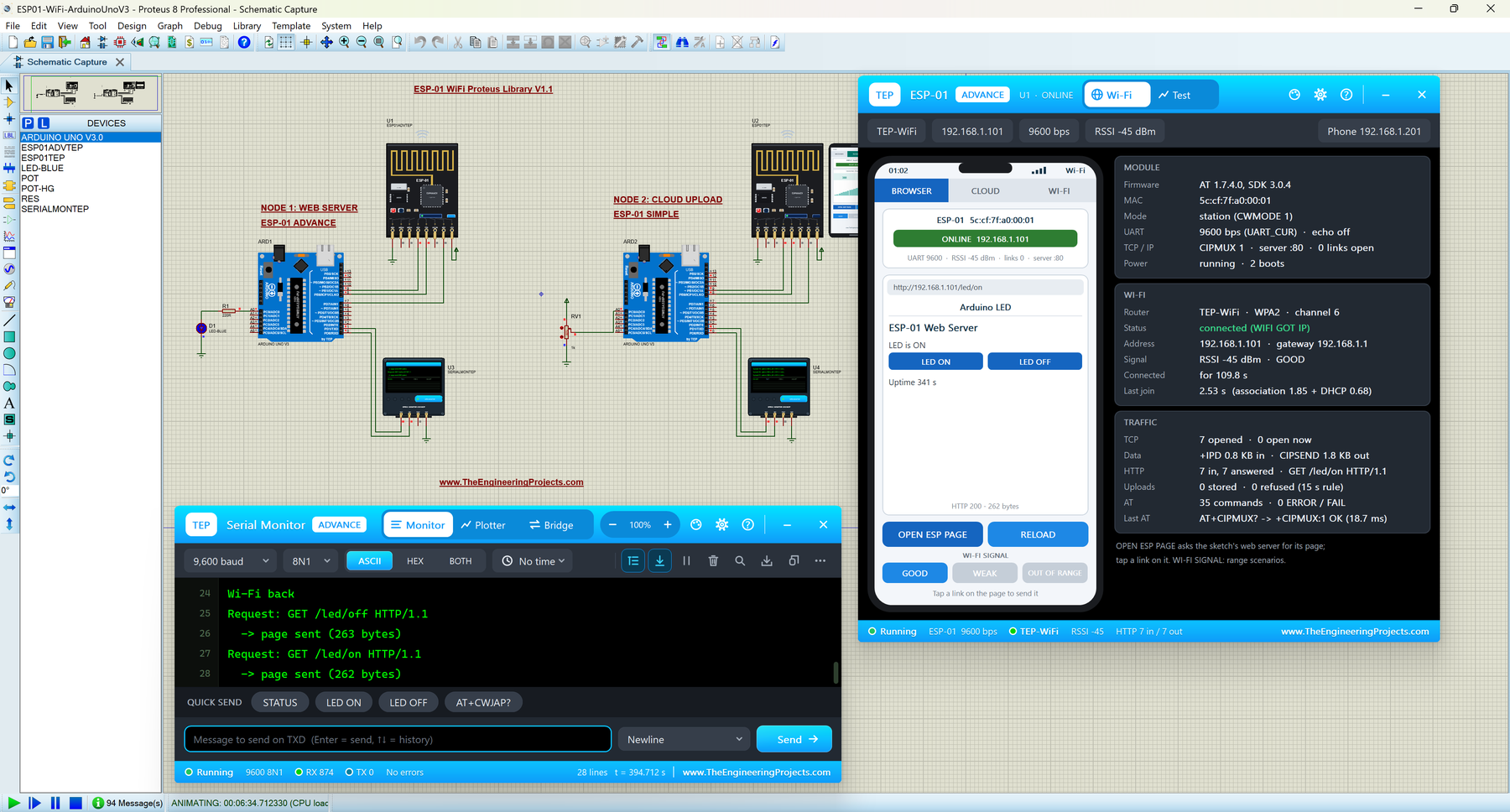
Hello friends, I hope you all are doing great. Today, I am going to share the new ESP-01 Wi-Fi Library for Proteus V1.1. The ESP-01 is the tiny black ESP8266 board that gives an Arduino Wi-Fi: with a handful of AT commands, your sketch can join a router, serve a web page to a phone, or upload sensor readings to the cloud. With this ESP-01 Library for Proteus, you can build and debug those IoT projects on your PC, without a 3.3 V supply, a router or an internet account. In this new version, you get two devices in one library: ESP-01 Simple, which draws a virtual smartphone on the schematic, and ESP-01 Advance, which opens a pop-up window with the phone and four real Wi-Fi test tools (Wi-Fi join, web request, cloud upload and AT check). I am also sharing a complete Arduino ESP8266 Proteus simulation: one UNO runs a web server that switches an LED from the phone's browser, and the other uploads a potentiometer reading to a cloud service every 20 seconds. NOTICE: This library is one of our biggest so far. Our ESP-01 model runs the AT firmware behaviour of the real module: the boot text, the UART speeds, Wi-Fi joins with DHCP, a TCP web server, a virtual internet host with a cloud API, and a virtual router that every ESP-01 in your design shares. It took our team a lot of hard work, many test runs and many design changes, and this library is a tribute to that effort. Your feedback is the fuel that keeps us going, so please tell us what you think in the comments below or in the ...
Hello friends, I hope you all are doing great. Today, I am going to share the new NEO-M8N GNSS Library for Proteus V1.1. The u-blox NEO-M8N is the GPS module of choice for drones, robots and trackers, because it listens to GPS and GLONASS at the same time. More satellites mean a faster, steadier and more accurate position, especially between buildings. With this NEO-M8N Library for Proteus, you can test your GNSS sketches on your PC and actually measure how much the second satellite system helps. In this version, you get two devices: NEO-M8N Simple, with a GNSS screen drawn on the schematic, and NEO-M8N Advance, with a pop-up window that holds the screen and five measured GNSS test tools. The star of this article is the Constellations test, which runs GPS only, GLONASS only and GPS + GLONASS one after another and compares them side by side. NOTICE: Our NEO-M8N model runs two complete satellite systems at once, 30 GPS satellites and 24 GLONASS satellites, and combines them into one fix with real dilution-of-precision maths. It took our team a lot of hard work, many test runs and many design changes, and this library is a tribute to that effort. Your feedback is the fuel that keeps us going, so please tell us what you think in the comments below or in the Proteus Libraries category of our forum. And if our free libraries help you in your studies or work, you can buy us a coffee (our donation page is coming soon). So, let's get started with the NEO-M8N Library for Proteus: The ...
Hello friends, I hope you all are doing great. Today, I am going to share the new NEO-7M GPS Library for Proteus V1.1. The u-blox NEO-7M is the next step after the famous NEO-6M: it is the same size and talks to your Arduino the same way, but it can also use the Russian GLONASS satellites instead of GPS. With this NEO-7M Library for Proteus, you can test your GPS sketches on your PC, switch between GPS and GLONASS with one click, and see for yourself which system works better where your project will live. In this version, you get two devices: NEO-7M Simple, with a GPS screen drawn on the schematic, and NEO-7M Advance, with a pop-up window that holds the GPS screen and five measured GNSS test tools: time to first fix, accuracy, NMEA check, route and a new Constellations test that puts GPS and GLONASS side by side. The demo has two Arduino UNOs, one for each device, both reading the position with TinyGPS++. NOTICE: Our NEO-7M model simulates two complete satellite systems: 30 GPS satellites and 24 GLONASS satellites moving over the sky, with signals, fixes and DOP values computed from their geometry. It took our team a lot of hard work, many test runs and many design changes, and this library is a tribute to that effort. Your feedback is the fuel that keeps us going, so please tell us what you think in the comments below or in the Proteus Libraries category of our forum. And if our free libraries help you in your studies or work, you can buy us a coffee (our donation page is ...
Hello friends, I hope you all are doing great. Today, I am going to share the new SIM800L GSM Library for Proteus V1.1. The SIM800L is the small GSM module that lets an Arduino send and receive SMS and make phone calls, so it is used in almost every "control it from my phone" project: home automation, alarms, trackers and remote switches. With this SIM800L Library for Proteus, you can build and test those projects on your PC, without a SIM card, a 2 A power supply or a 2G network. In this new version, you get two devices in one library: SIM800L Simple, which draws a virtual smartphone on the schematic, and SIM800L Advance, which opens a pop-up window with the phone and four real GSM test tools (network registration, SMS round trip, call test and AT check). I am also sharing a complete Arduino SIM800L Proteus simulation: two Arduino UNOs that switch an LED by SMS, reject calls and take AT commands from our TEP Serial Monitor. NOTICE: This library is very special to our team. Our SIM800L model does not replay a fixed script: it learns the baud rate like the real module, registers on a simulated network, delivers SMS between modules and phones by their numbers, rings with the caller's number and pulses the RING pin, right inside Proteus. It took our team a lot of hard work, many test runs and many design changes, and this library is a tribute to that effort. Your feedback is the fuel that keeps us going, so please tell us what you think in the comments below or in the Proteus ...
Hello friends, I hope you all are doing great. Today, I am going to share a list of Must-Have Proteus Libraries for Arduino Simulation. Whatever your project is, a GSM alarm, a weather station or a line follower, its Proteus simulation always needs the same basic things: an Arduino board, a way to see what the code is printing, a display, maybe a real-time clock, a driver for motors and something to power the circuit. These are the libraries you will install once and use in almost every project. Proteus does have some of these parts in its own library, but often in a very basic form. Our versions look like the real boards and modules, which makes your circuit diagrams and project reports much clearer, and our new TEP Serial Monitor replaces the small Proteus Virtual Terminal with a modern window that works like the Serial Monitor of the Arduino IDE. In this list, our two new serial monitor tools come first, because they make every other library easier to debug. After them, you will find our Arduino boards, display, clock, driver and power libraries, and a short guide to loading your Arduino code into Proteus. If you are new to Proteus libraries, read How to Add New Library in Proteus 8 first. So, let's get started with the Must-Have Proteus Libraries for Arduino Simulation: If you have simulated an Arduino in Proteus, you have used the Virtual Terminal to see what your code prints with Serial.println(). The TEP Serial Monitor does the same job in a modern window that works ...