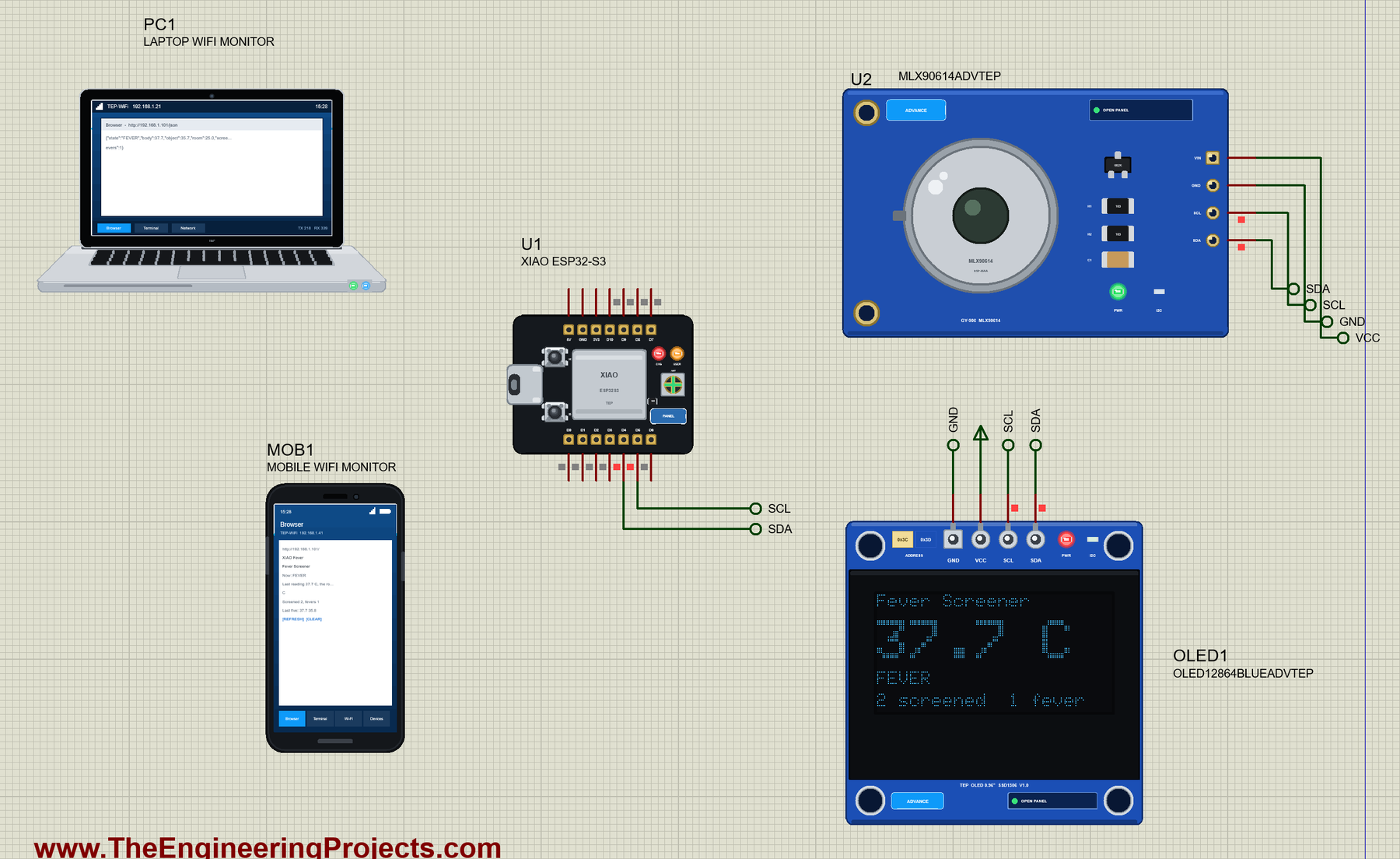
Hello friends, I hope you all are doing great. Today, I am going to share the XIAO ESP32-S3 Library for Proteus. The XIAO ESP32S3 from Seeed Studio is one of the most popular small IoT boards you can buy: an ESP32-S3 dual-core chip, 8 MB of PSRAM, Wi-Fi and Bluetooth LE, USB-C and a battery charger on a board the size of a thumbnail - 21 x 17.8 mm. With this library it runs your ESP32-S3 Arduino sketch in Proteus 8.5 and joins our virtual Wi-Fi network. For the demo we built something every airport and hospital door has needed: a non-contact fever screener. An MLX90614 infra-red thermometer reads the forehead without touching it, an OLED shows the result, the board's own orange LED warns of a fever, and a phone and a laptop follow the count of people screened on the board's web page. NOTICE: Proteus has no ESP32-S3 model, so our team has put a lot of effort into building this board ourselves: the XIAO's pins, LEDs, buttons and Wi-Fi are all our own model, and your sketch compiles with our free TEP Boards for Proteus add-on. Your feedback is the fuel that keeps us going, so please tell us what you think in the comments below or in the XIAO ESP32-S3 board of our forum. And if our free libraries help you, you can buy us a coffee. So, let's get started with the XIAO ESP32-S3 Library for Proteus: XIAO is Seeed Studio's family of tiny boards, all with the same 21 x 17.8 mm footprint and the same 14 pins, each with a different chip. The XIAO ESP32S3 carries Espressif's ESP32-S3: two ...
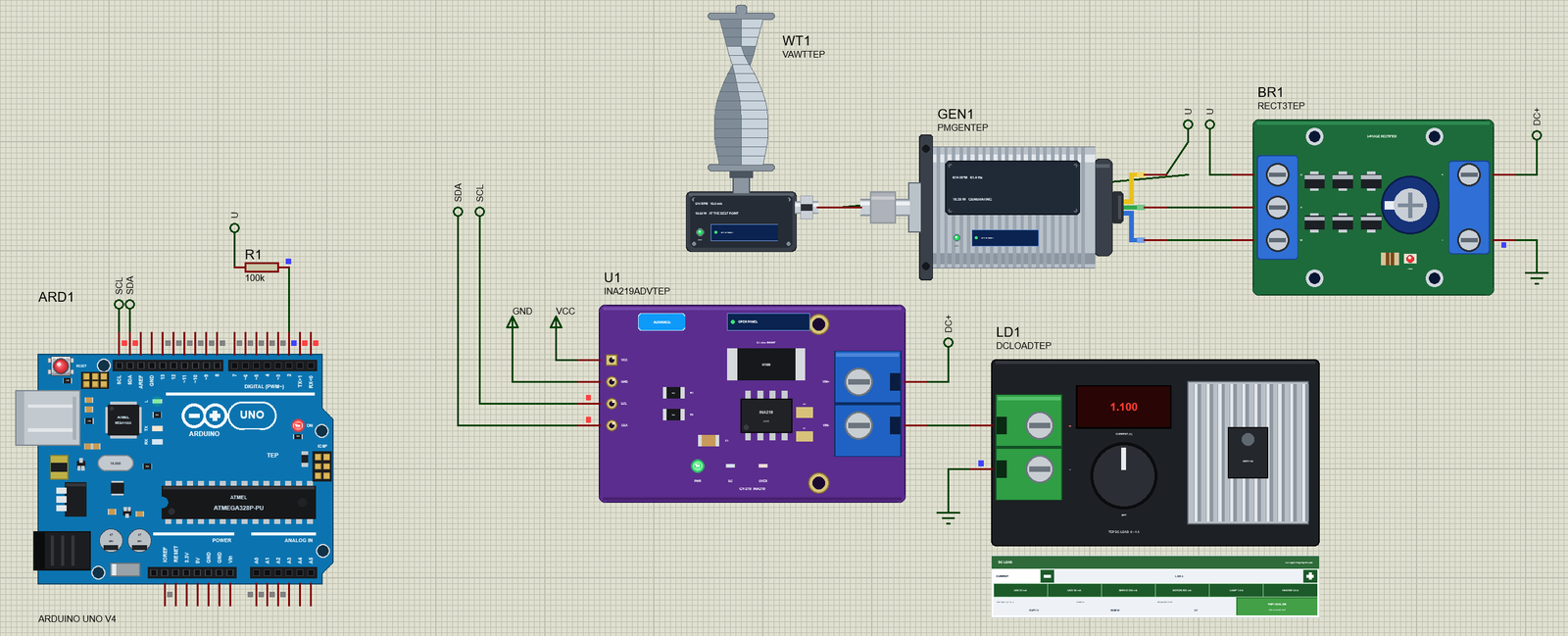
Hello friends, I hope you all are doing great. Today, I am going to share the new Vertical-Axis Wind Turbine Library for Proteus V1.0, the fourth part of our renewable energy series. You have probably seen one on a rooftop, a lamp post or a school roof: a short, twisted "barrel" of two curved buckets spinning on a vertical shaft. That is a helical Savonius wind turbine, the simplest wind turbine there is - it starts by itself, it takes the wind from any side, and it is quiet and safe. This library puts that turbine into Proteus - the rotor, its curves and its moods. Its torque and its power follow the wind and the load: a load that fits the wind holds it at its best point, a lighter one lets it race, too heavy a one stalls it. Its shaft is a real pin: it drives our new 3-Phase PM Generator Library for Proteus through a wire, and the turbine, the generator, the rectifier and the load are simulated together. The demo measures the whole chain from an Arduino UNO V4.0. NOTICE: a wind turbine in a circuit simulator is usually just a voltage source that follows a "wind" number. Our team put a lot of effort into building one that behaves like the real thing: a rotor with its own torque curve and inertia, a shaft that a generator really loads, a stall, gusts - and buckets you can watch turn on the sheet. Your feedback is the fuel that keeps us going, so please tell us what you think in the comments below or in the Motor Driver board of our forum. And if our free libraries help you, ...
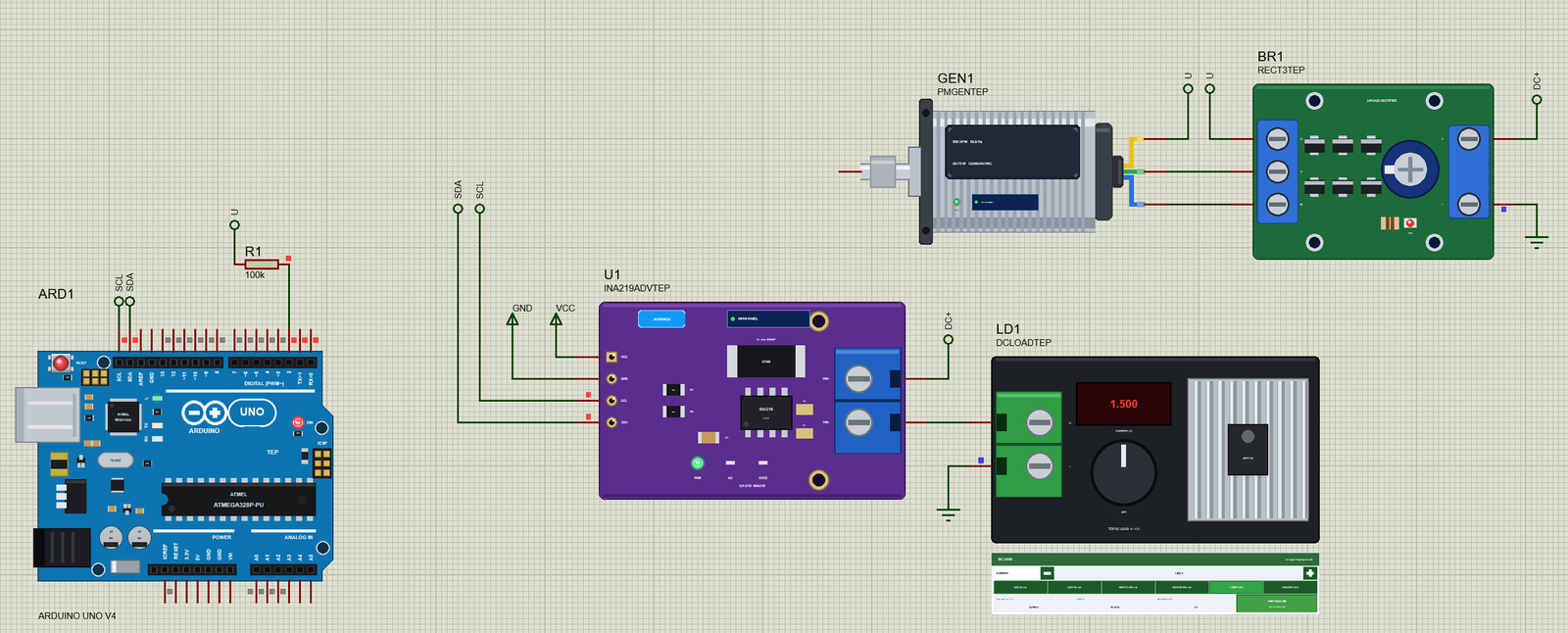
Hello friends, I hope you all are doing great. Today, I am going to share the new 3-Phase PM Generator Library for Proteus V1.0, the third part of our renewable energy series. Open up almost any small wind turbine, water turbine or hand-crank charger and you will find the same part inside: a 3-phase permanent-magnet generator (PMG) - a ring of magnets turning inside a ring of coils, with three wires coming out, usually yellow, green and blue. This library puts that generator into Proteus, together with the 3-phase rectifier board that turns its AC into DC. Its three phases are real AC: their voltage and their frequency both follow the speed, and the current you take brakes the shaft. And it has a SHAFT pin: wire a turbine to it and the turbine, the generator and the load are simulated together - which is exactly what our next library, the vertical-axis wind turbine, will do. The demo turns it with a built-in bench motor and measures it from an Arduino UNO V4.0. NOTICE: a generator looks like a motor with three wires - and in a simulation it is often just a voltage source. Our team put a lot of effort into building one that behaves like the real thing: three phases with their resistance and inductance, a torque that grows with the current, a shaft that slows down when nothing drives it, and a pop-up that shows the phases live. Your feedback is the fuel that keeps us going, so please tell us what you think in the comments below or in the Motor Driver board of our forum. And if ...
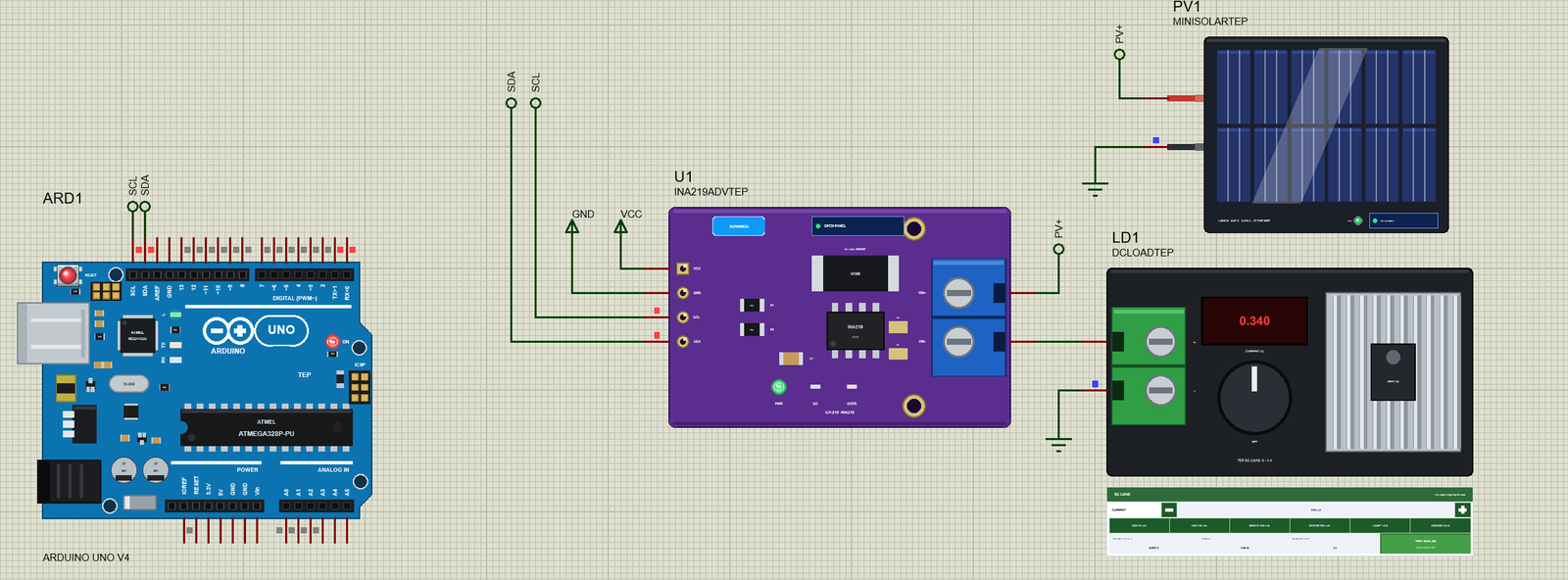
Hello friends, I hope you all are doing great. Today, I am going to share the new 6V Mini Solar Panel Library for Proteus V1.0, the second part of our renewable energy series. If you have ever built a solar garden light, a solar phone charger, a solar-powered Arduino or ESP32 node or a school experiment with the sun, you have used this part: the small black 6 V mini solar panel of 1 to 3 W, with its dark-blue cell strips under clear epoxy and two thin wires on the back. This library puts that panel into Proteus as a part of its own - with its real I-V curve. Its current follows the light, its voltage follows the load, and one point on its curve gives the most power: the maximum power point. It also shows the two things that surprise people with small panels. There is no bypass diode, so a single leaf on one cell takes about three quarters of the power and drives that cell into reverse - a hot spot. And indoors it still shows 5 V on a meter while it gives only milliwatts. The demo measures it with our INA219 current sensor from an Arduino UNO V4.0. NOTICE: a mini solar panel looks like a little 6 V battery - but it behaves nothing like one. Our team put a lot of effort into building a panel that behaves like the real thing: 12 cells with their I-V curve, the heat, the light, the shade and the hot spot of a shaded cell. Your feedback is the fuel that keeps us going, so please tell us what you think in the comments below or in the Motor Driver board of our forum. And if our free ...
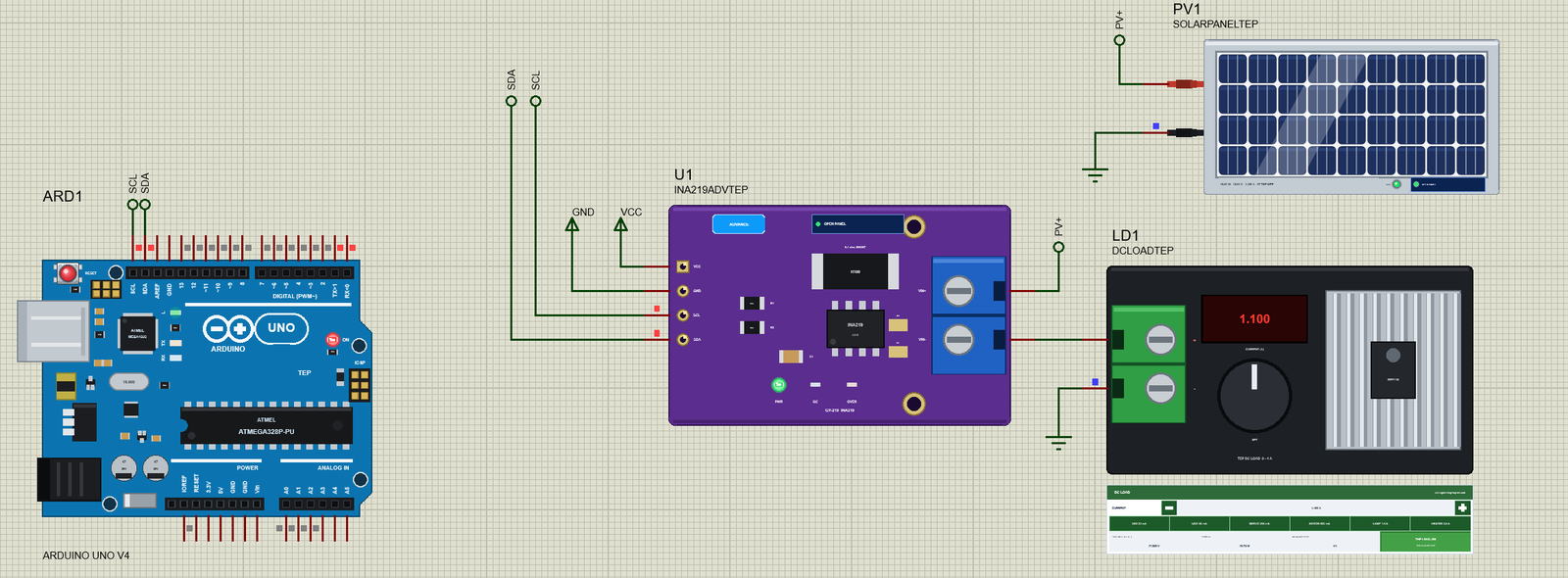
Hello friends, I hope you all are doing great. Today, I am going to share the new 12V Solar Panel Library for Proteus V1.0, the first part of our new renewable energy series. If you have ever powered a garden light, a weather station, a gate opener or an off-grid Arduino project from the sun, you have met this part: the aluminium-framed 12 V solar panel with its rows of dark-blue cells and two cables with MC4 connectors. This library puts that panel into Proteus as a part of its own - a real one, with its I-V curve. Its current follows the light, its voltage follows the load, and only one point on its curve gives the most power: the maximum power point. It also does the things that surprise people with real panels: the voltage collapses when a load asks for more than the light makes, a single leaf takes half the panel out through a bypass diode, and a cloudy sky leaves only a fifth of the power. The demo measures it with our INA219 current sensor from an Arduino UNO V4.0. NOTICE: a solar panel looks like a battery that charges in the sun - but it behaves nothing like one. Our team put a lot of effort into building a panel that behaves like the real thing: 36 cells with their I-V curve, the two bypass diodes, the heat, the shade and the light. Your feedback is the fuel that keeps us going, so please tell us what you think in the comments below or in the Motor Driver board of our forum. And if our free libraries help you, you can buy us a coffee. So, let's get started with the ...
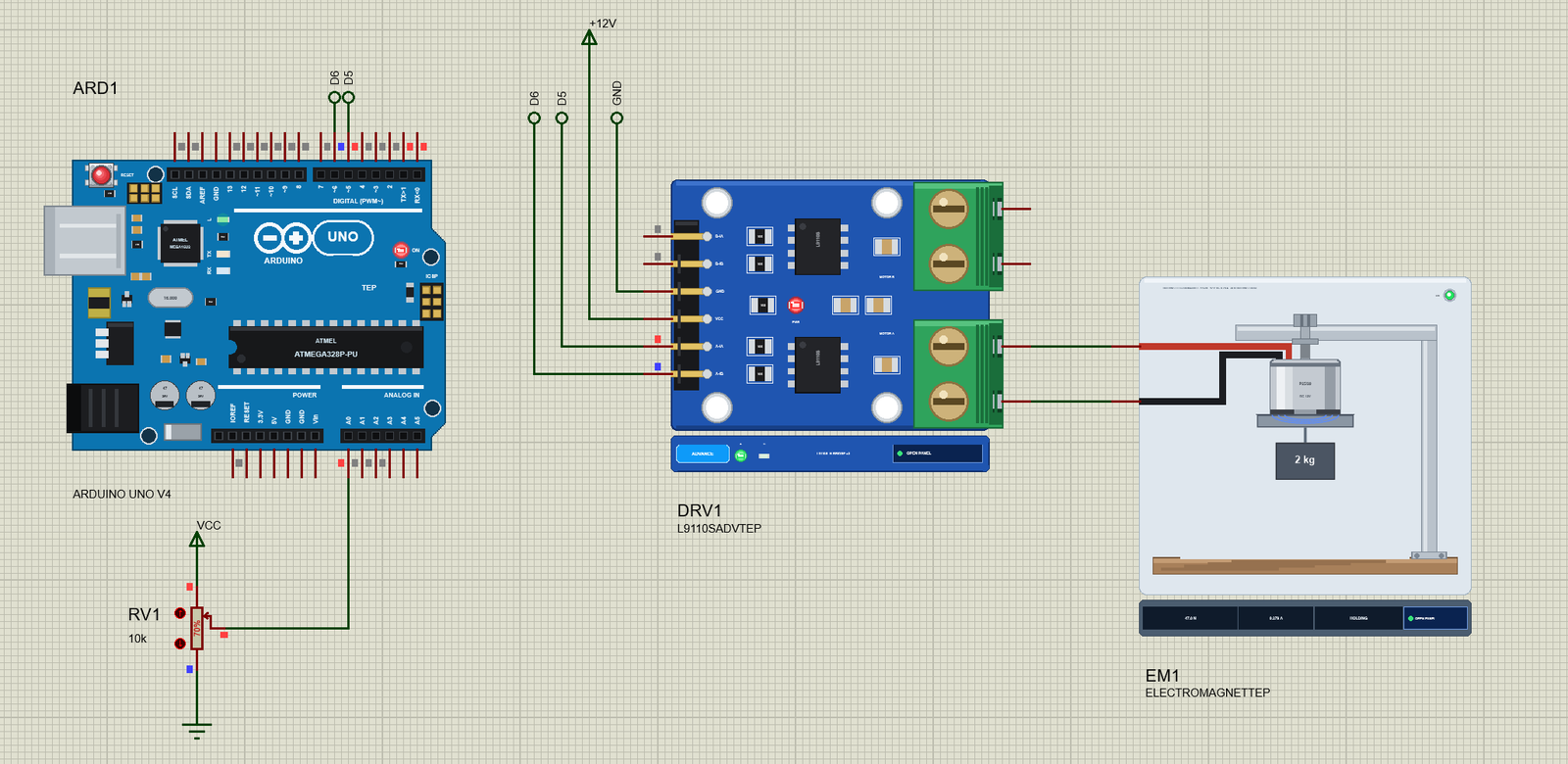
Hello friends, I hope you all are doing great. Today, I am going to share the new 12V Holding Electromagnet Library for Proteus V1.0. If you have ever built a pick-and-place gripper, an electromagnetic door holder, a sorting machine or an escape-room lock with an Arduino, you have probably used this part: the small round 12 V holding electromagnet, a shiny steel pot about the size of a coin stack with an M4 stud on top. Power it and it grabs a steel plate; cut the power and it lets go. This library puts that magnet into Proteus as a part of its own. Its coil is in the circuit, it pulls on a steel plate that carries a load, and the plate falls onto the table when the pull is not enough. It also does the things that surprise people with real magnets: it drops a load through a thin coat of paint, it lets go a little late, and a light plate can stay stuck after the power is off. The demo drives it from an Arduino UNO V4.0 through our L9110S driver, which can also send the short reverse pulse that cures the sticking. NOTICE: an electromagnet looks like the simplest part there is - a coil that becomes a magnet. Our team put a lot of effort into building one that behaves like the real thing: the coil and its changing inductance, the pull that falls with every fraction of a millimetre, the load, the release time and the magnetism the steel keeps. Your feedback is the fuel that keeps us going, so please tell us what you think in the comments below or in the Motor Driver board of our ...
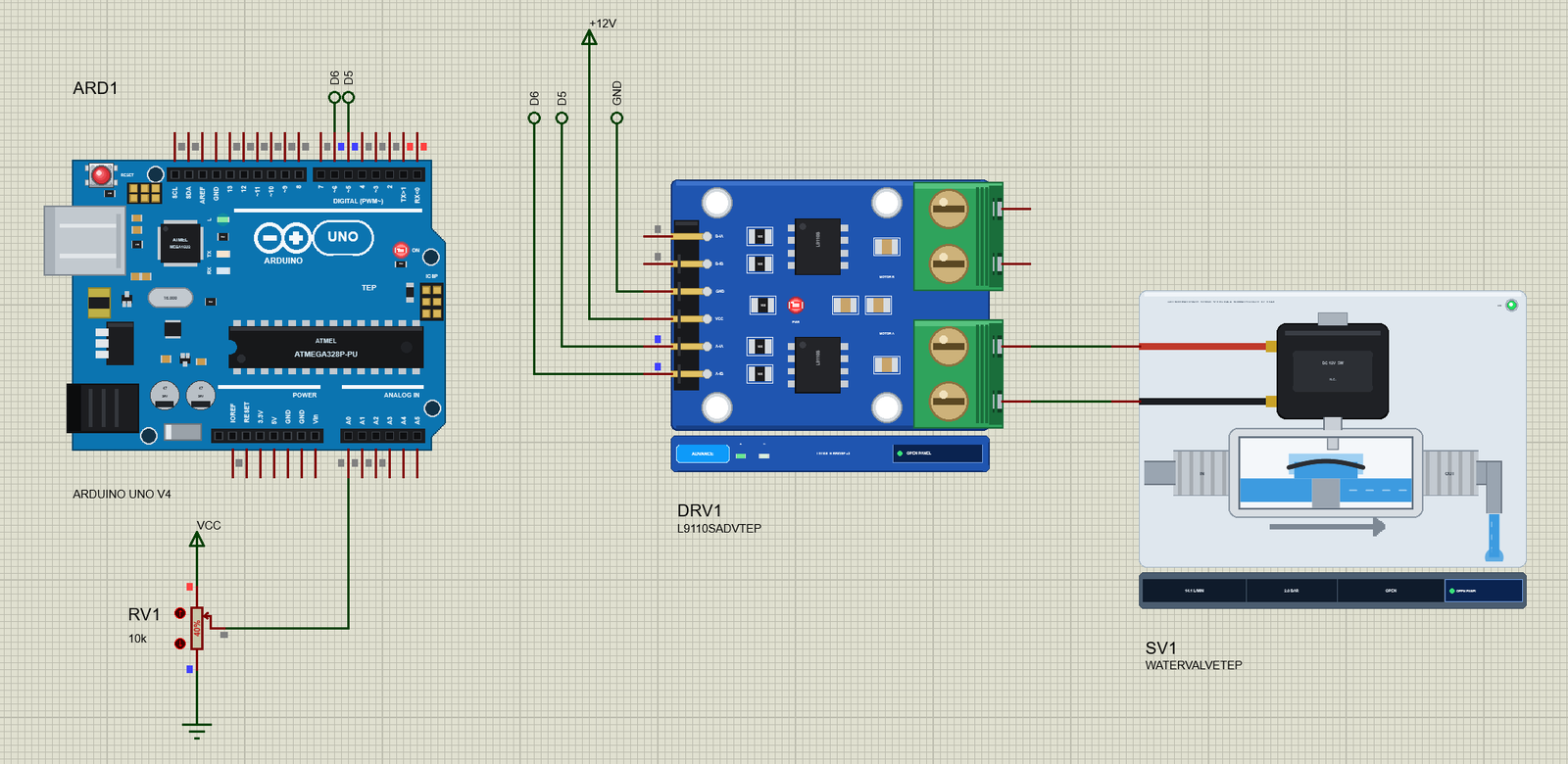
Hello friends, I hope you all are doing great. Today, I am going to share the new 12V Solenoid Water Valve Library for Proteus V1.0. If you have ever built an automatic plant watering system, a water dispenser, an aquarium top-up or a coffee machine with an Arduino, you have met this part: the little 12 V solenoid water valve with a white or grey plastic body, two threaded ports and a black coil on top. Power the coil and the water flows; cut the power and it stops. This library puts that valve into Proteus as a part of its own. Its coil is in the circuit, its pilot plunger lifts, its rubber diaphragm opens with the water pressure, and the water flows - in litres per minute, adding up to litres. It also does the things that catch people out with real valves: it will not open without enough pressure, it will not open against too much, and a hold PWM that is too low lets it drop shut. The demo drives it from an Arduino UNO V4.0 through our L9110S driver, with the "kick and hold" trick that keeps the coil cool. NOTICE: a solenoid valve looks like a switch for water - power on, water on. Our team put a lot of effort into building one that behaves like the real thing: the coil and its inductance, the pilot plunger, the diaphragm that needs pressure, the flow and the heat. Your feedback is the fuel that keeps us going, so please tell us what you think in the comments below or in the Motor Driver board of our forum. And if our free libraries help you, you can buy us a coffee. So, ...
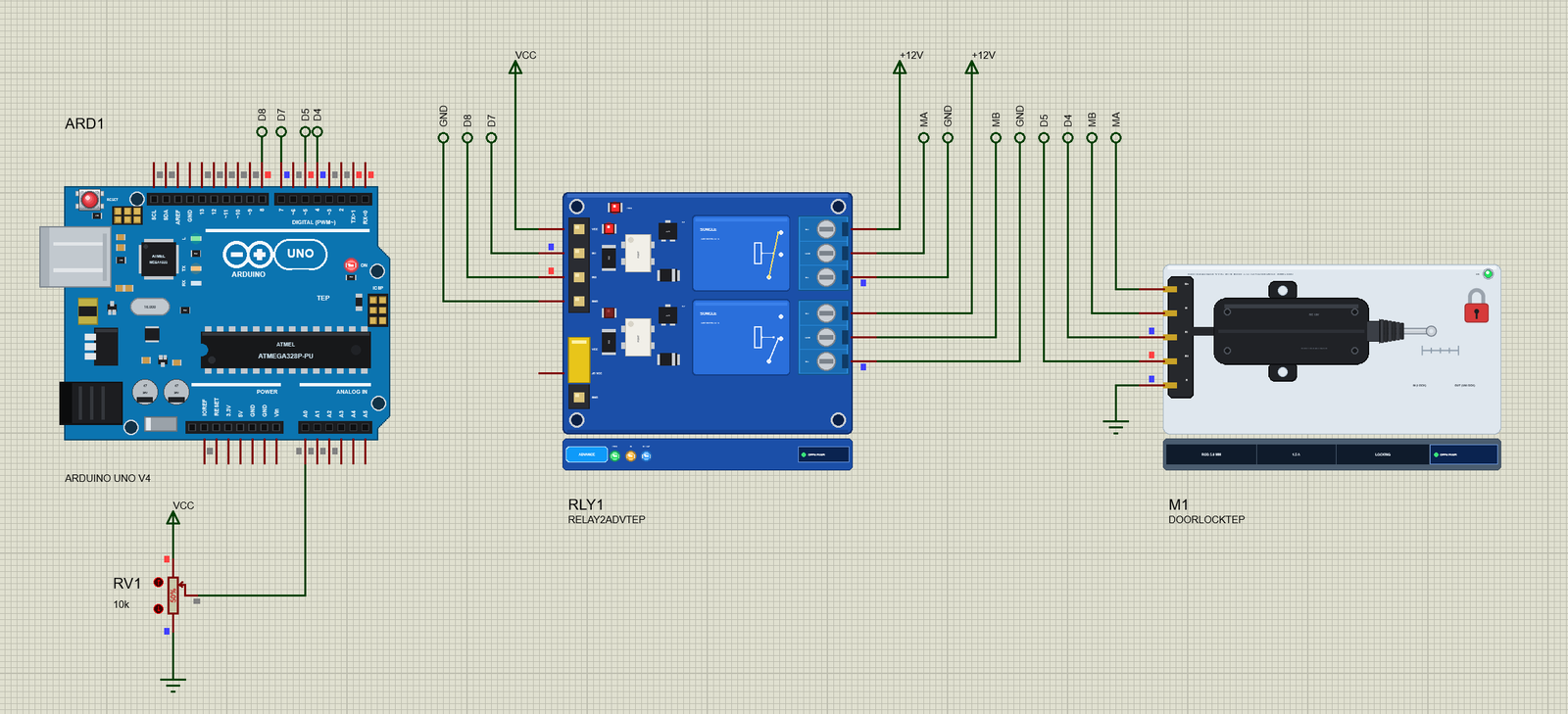
Hello friends, I hope you all are doing great. Today, I am going to share the new Car Door Lock Actuator Library for Proteus V1.0. Press the lock button on a car key, and in every door a small black box goes "clack": that is the door lock actuator, the motor of the central locking. The same actuator is sold on its own for a few dollars in every aftermarket central-locking kit, and makers use it for drawer and cabinet locks, pet doors, escape-room props and small linear jobs where a strong 20 mm push or pull is enough. This library puts that actuator into Proteus as a part of its own. Its motor is in the circuit, its gears and rack move a steel rod 20 mm in or out, the rod stops dead at each end and the motor stalls there, and its position switch tells the controller where the rod is. You can put it on the door lock, on the bench or on a jammed lock, and even move the rod by hand as the key or the knob would. The demo drives it from an Arduino UNO V4.0 through our two-channel relay module, wired as the classic central-locking circuit. NOTICE: a door lock actuator looks like the simplest motor there is - two wires and a rod. Our team put a lot of effort into building one that behaves like the real thing: the stroke that takes a fifth of a second, the stall at the stop, the position switch, the lock's spring and a lock that jams. Your feedback is the fuel that keeps us going, so please tell us what you think in the comments below or in the Motor Driver board of our forum. And if ...
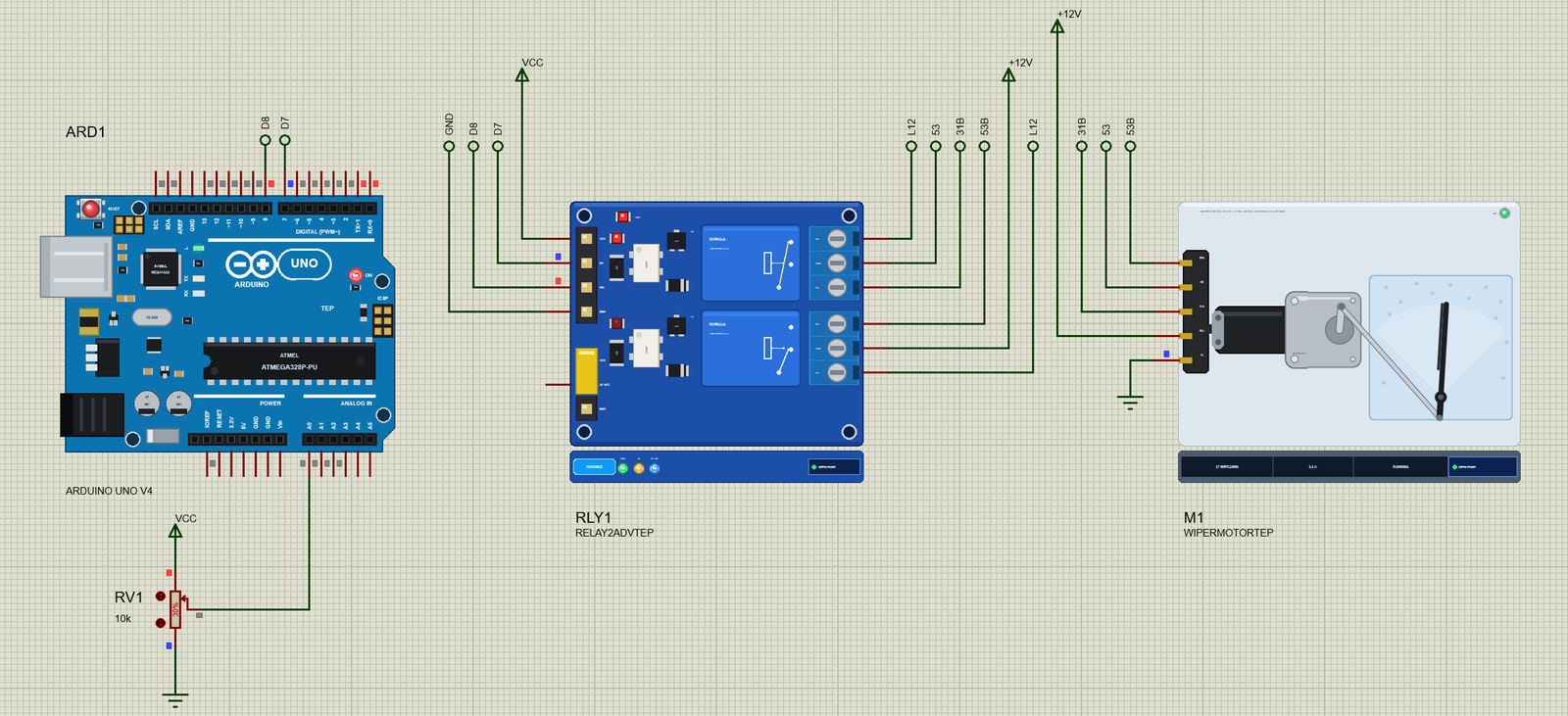
Hello friends, I hope you all are doing great. Today, I am going to share the new Car Wiper Motor Library for Proteus V1.0. Every car has one behind the dashboard: a 12 V wiper motor, a black DC motor bolted to an aluminium worm gearbox that swings the wiper arms across the windscreen. Makers love it too - it is strong, slow, self-locking and cheap from any scrapyard, so it ends up in robots, animatronic props, Halloween figures, gate openers and camera sliders. This library puts that motor into Proteus as a part of its own - with the two speeds of a real wiper motor, its park switch, the crank, the rod and the arm sweeping across a piece of glass. Switch it off in the middle of a wipe and it does what a real one does: it keeps running on its own park switch until the arm is down, then brakes and stops. Wet, dry or icy glass changes the load, and on ice it stalls. The demo runs it from an Arduino UNO V4.0 through our two-channel relay module, wired as the classic two-relay wiper circuit. NOTICE: a wiper motor looks simple until you wire one - five terminals, two speeds and a switch inside that decides when it may stop. Our team put a lot of effort into building one that behaves like the real thing: the brushes, the worm gear, the park cam, the linkage and the glass. Your feedback is the fuel that keeps us going, so please tell us what you think in the comments below or in the Motor Driver board of our forum. And if our free libraries help you, you can buy us a coffee. So, ...
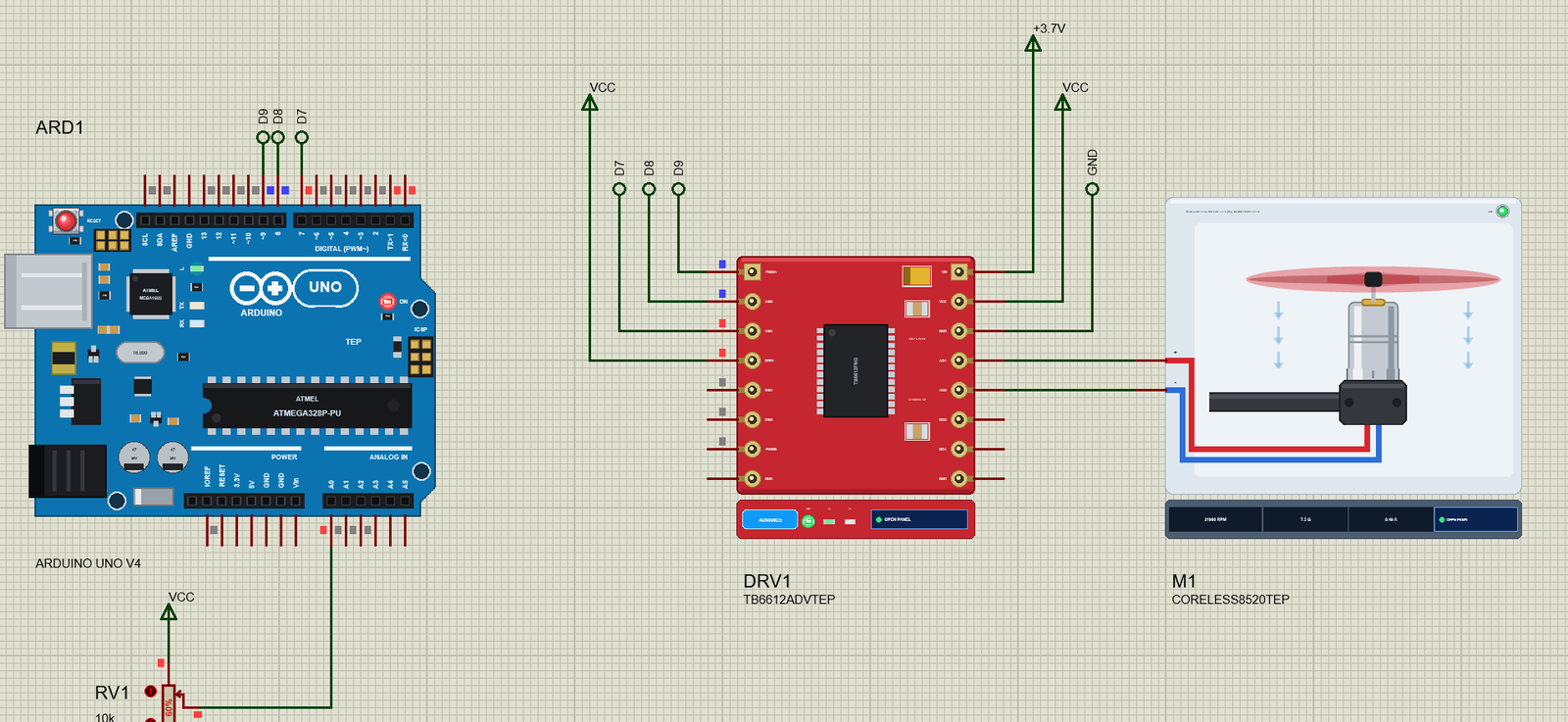
Hello friends, I hope you all are doing great. Today, I am going to share the new 8520 Coreless Motor Library for Proteus V1.0. If you have ever opened a toy quadcopter, a palm-sized racing drone or a tiny fast robot, you have met the 8520 coreless motor: a silver can 8.5 mm wide and 20 mm long with a propeller pressed on its shaft. It is a brushed DC motor, but a special one - its winding is a basket of copper with no iron inside, which makes it light, very fast and very quick to respond. This library puts that motor, with its 46 mm propeller, into Proteus as a part of its own. Its windings are in the circuit with their resistance and their tiny inductance, its back-EMF follows the rotor, and the propeller loads it and gives thrust - in grams, both ways. That tiny inductance is the heart of this library: drive the motor with a slow PWM and its current chops into pulses that heat it without lifting anything more. A pop-up window shows the current pulse by pulse, so you can see it. The demo drives it from an Arduino UNO V4.0 through our TB6612FNG driver on a 3.7 V supply. NOTICE: a coreless motor looks like any small DC motor on a schematic - two pins and a circle. Our team put a lot of effort into building one that behaves like the real thing down to the microsecond: a light rotor, a propeller that pushes air, and a current that only stays smooth when the PWM is fast enough. Your feedback is the fuel that keeps us going, so please tell us what you think in the comments below ...