


PIR Sensor Library for Proteus


Hello friends! Today, we will install the PIR Sensor Library for Proteus and build a motion-detection demonstration with Arduino. We will first understand the sensor's output, then install the library, connect the circuit and write a program that reports when a motion event starts and ends.
PIR Sensor Library for Proteus
Latest version: PIR Sensor Library for Proteus V4.0 (October 2026): HC-SR501 with time delay, the H / L jumper, warm-up, Simple and Advance devices and an Arduino demo
Earlier versions: V3.0 (2023) · V2.0 (2020) · V1.0 (2016, this tutorial)
Helping Tools
- Serial Monitor Advance: a serial terminal window for the UART of your board
- Serial Monitor Expert: the serial monitor with extra debugging tools
- LCD Library for Proteus V3.0: 16x2, 20x4 and I2C LCDs to show your readings
The original PIR model uses a TestPin to represent motion in the simulation. That input lets us exercise the receiving circuit without trying to reproduce a person walking through an infrared detection pattern. It is a simulation control, not an extra connection found on a typical three-pin PIR module.
We will also improve the timing explanation. A sensor output going LOW and an application declaring an area inactive are different events. Our Arduino example waits for five continuous seconds of LOW before ending an event, while remaining responsive to a new HIGH during that interval.
What Is a PIR Motion Sensor?
PIR means passive infrared. A PIR detector responds to changes in infrared radiation reaching its sensing elements. In a module, the sensing element, optical arrangement and signal-conditioning electronics work together to produce an output that a microcontroller can read.
The word passive means that this sensing method does not illuminate the target with an emitted measurement beam. A changing thermal scene can create a detection, but the output does not identify the object, count people or measure their exact distance.
Panasonic's PIR motion-sensor FAQ explains the importance of the detection area and stable mounting. Moving a sensor can change the thermal scene it observes. Consequently, a PIR module is normally mounted in a fixed position and evaluated in the environment where it will operate.
For our first project, we only need a digital interpretation: HIGH means the module is asserting its detection output, and LOW means it is not asserting that output. Neither state is a complete description of room occupancy. A stationary person can remain present without producing the changes needed for another detection.
What This Original Proteus Model Supports
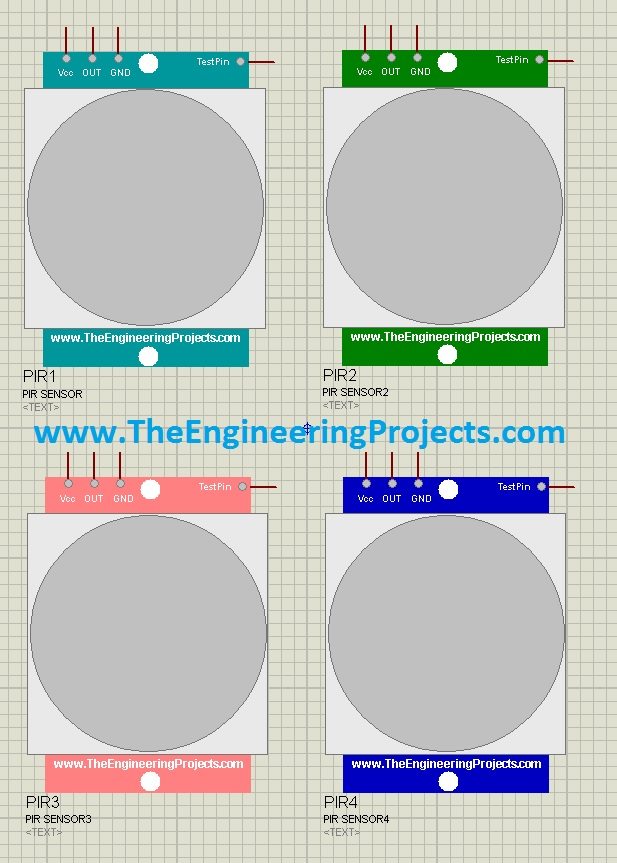
This library provides four differently colored PIR components with the same basic behavior for the demonstration. Select whichever appearance suits the schematic. Their color does not create a different detection range, sensitivity or output protocol.
| Connection | Purpose in this simulation |
|---|---|
| VCC | Connect to the supply used by the demonstrated model |
| GND | Common circuit reference |
| OUT | Digital detection signal read by the Arduino |
| TestPin | Simulation input used to request a motion state |
Set TestPin HIGH to exercise detection and LOW to remove the simulated motion condition. This arrangement is useful for checking logic, messages and application timers. It does not model a moving person's thermal signature, a Fresnel lens pattern or the effects of sunlight and air movement on a physical installation.
If you need a more detailed model, see the PIR Sensor Library for Proteus V4.0, which documents its own HC-SR501 controls and startup behavior. Earlier alternatives include V3.0 and the V2.0 library. Follow the instructions for the version actually installed rather than mixing its controls with this original TestPin example.
Download and Install the PIR Library
Download the original package below and extract it. The files used in this tutorial are PIRSensorTEP.LIB, PIRSensorTEP.IDX and PIRSensorTEP.HEX. Keep the original package available so that you can distinguish these files from similarly named files belonging to a newer release.
- Close Proteus.
- Find the library directory configured for your installation.
- Copy the LIB and IDX files into that directory.
- Keep the HEX file in a stable project folder.
- Restart Proteus and search for the PIR sensor in Pick Devices.
- Place one sensor on the schematic.
- Open its properties and assign
PIRSensorTEP.HEXas the sensor's Program File.
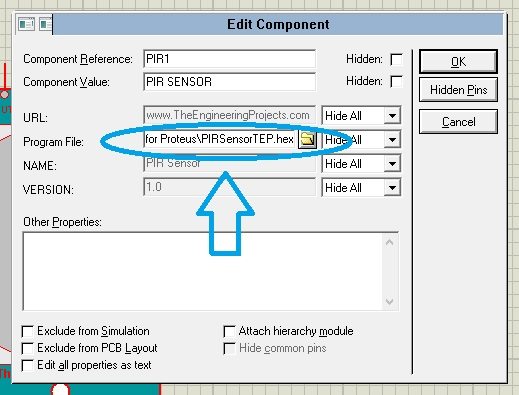
The library files make the symbol available, while the support HEX supplies its simulated behavior. If the symbol appears but does not operate, inspect the Program File path before reinstalling the library. A path pointing into a temporary extraction folder may stop working after that folder is removed.
Do not confuse the sensor support file with your Arduino program. The PIR component receives PIRSensorTEP.HEX; the Arduino receives the HEX compiled from the sketch below. Each program belongs to a different simulated device.
Connect the PIR Sensor to Arduino
We will use an Arduino UNO and read the sensor output on digital pin D2. Add a logic-state control to TestPin so that you can change the input while the simulation runs. Add a Virtual Terminal to observe the Arduino's event messages.
| Signal | Connection | Why it is needed |
|---|---|---|
| PIR VCC | 5 V supply in this demonstration | Powers the simulated module |
| PIR GND | Common ground | Provides the reference for its output |
| PIR OUT | Arduino D2 | Digital input to the application |
| PIR TestPin | Interactive logic-state source | Controls the simulated detection condition |
| Arduino D1/TX | Virtual Terminal RXD | Carries the printed event messages |
| Virtual Terminal | 9600 baud, 8N1 | Matches the Arduino serial configuration |
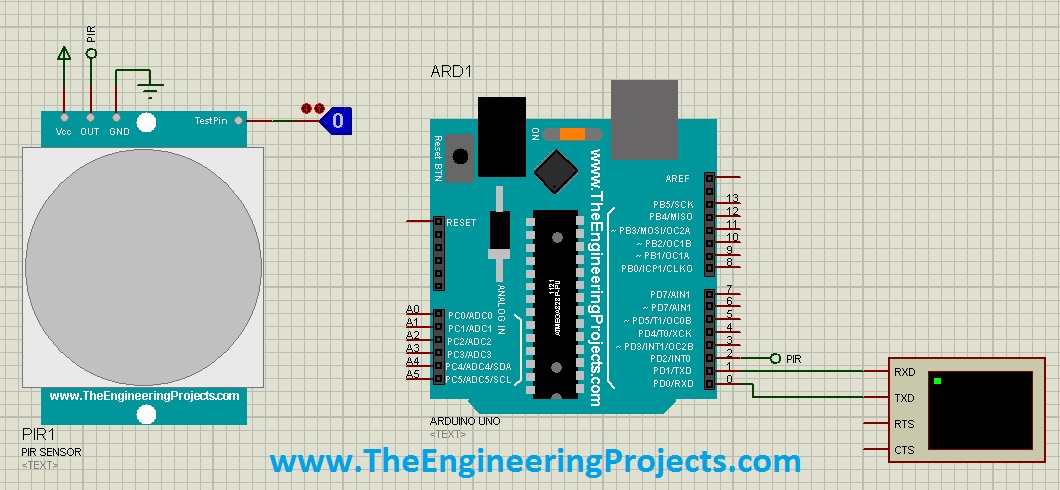
Keep TestPin LOW when starting the first run. This gives the program a clear inactive state before you create an event. Check the OUT signal directly if necessary; it helps distinguish a sensor-control problem from a problem in the Arduino's event logic.
A physical module may have a different supply range and output voltage from another module sold under the same general PIR description. Check the specific board documentation before connecting real hardware. The 5 V supply used here is a statement about this demonstration, not a universal rating for every PIR sensing element.
Arduino Program for Motion Events
The following sketch reports one message when detection begins and one message after the sensor has remained LOW for five seconds. It avoids a five-second blocking delay, so a new HIGH can cancel the pending end of the event immediately.
const byte pirPin = 2;
const unsigned long quietTimeMs = 5000UL;

bool motionActive = false;
bool timingLow = false;
unsigned long lowStartedAt = 0;

void setup() {
  pinMode(pirPin, INPUT);
  Serial.begin(9600);
  Serial.println("PIR demonstration ready");
}

void loop() {
  const unsigned long now = millis();
  const bool detected = digitalRead(pirPin) == HIGH;

  if (detected) {
    timingLow = false;
    if (!motionActive) {
      motionActive = true;
      Serial.print("Motion detected at ");
      Serial.print(now / 1000UL);
      Serial.println(" s");
    }
  } else if (motionActive) {
    if (!timingLow) {
      lowStartedAt = now;
      timingLow = true;
    }
    if (now - lowStartedAt >= quietTimeMs) {
      motionActive = false;
      timingLow = false;
      Serial.print("Motion event ended at ");
      Serial.print(now / 1000UL);
      Serial.println(" s");
    }
  }
}
Compile the sketch for the UNO, export the compiled binary and assign the resulting application HEX to the simulated Arduino. Match the simulated processor clock to the board configuration. A clock mismatch affects serial communication and timing, so correct it before judging the five-second behavior.
How the state variables work
motionActive records whether the application currently considers an event active. It does not simply mirror the input. Once HIGH begins an event, the event remains active through short LOW intervals until the quiet-time requirement has been satisfied.
timingLow records whether a continuous LOW interval is being measured. The first LOW sample stores the current time. Further LOW samples leave that starting time unchanged, allowing the interval to accumulate. Any HIGH clears this timing state, so the next LOW starts a fresh interval.
The elapsed-time calculation uses unsigned subtraction: now - lowStartedAt. This is the usual approach for short intervals measured with a wrapping unsigned millisecond counter. It is preferable to comparing against a future absolute timestamp that may wrap across the counter boundary.
The startup state deliberately avoids printing an event-ended message before any detection has occurred. This makes the serial log describe actual application transitions rather than repeatedly announcing that an initially inactive input is still inactive.
Why the original calibration variable was misleading
The older sketch declared a calibration-time variable but did not use it to implement a startup wait. Declaring a number does not delay execution or calibrate the sensor. The revised demonstration therefore makes no claim that an unused variable performs calibration.
Physical PIR modules can need a settling interval after power is applied. Use the interval specified for the actual module and implement an explicit startup state if your application needs to ignore readings during that period. This original TestPin model does not establish a universal warm-up time for hardware.
Run the Simulation Step by Step
- Start with TestPin LOW and run the simulation.
- Confirm that the terminal displays the ready message.
- Set TestPin HIGH and observe a single motion-detected message.
- Leave it HIGH and confirm that the program does not print the same event repeatedly.
- Set TestPin LOW and wait less than five seconds.
- Set it HIGH again; the pending end should be canceled.
- Finally, set it LOW and leave it there for at least five seconds.
- Observe the event-ended message and then create another HIGH to begin a new event.
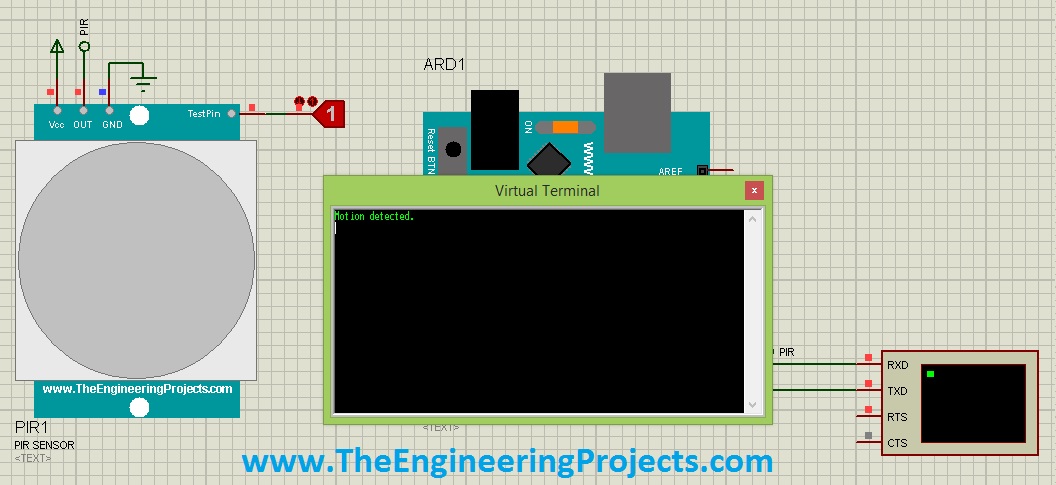
The detected-state screenshot shows the purpose of the terminal output: a readable event record that can be compared with your input changes. Exact wording and timestamps may differ from the archived sketch because the revised code makes the state transitions more explicit.
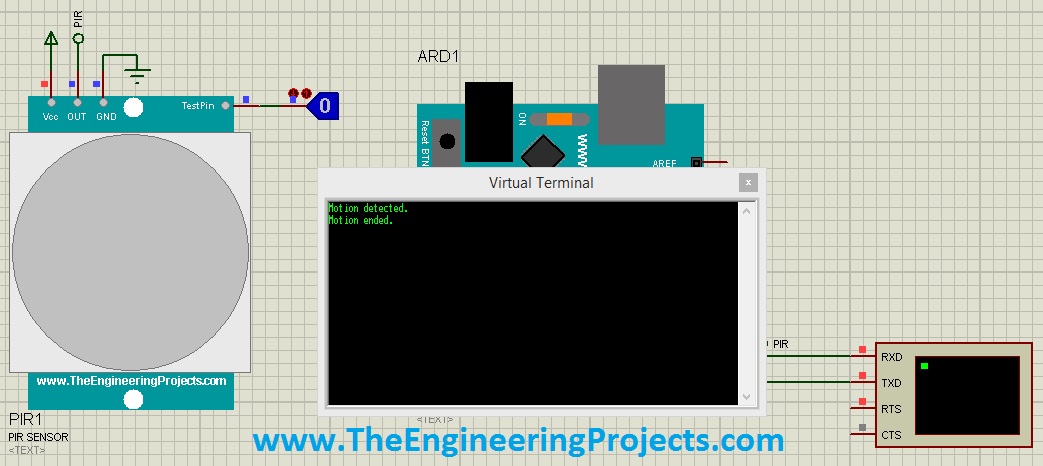
The ended-state screenshot illustrates the second transition. In the revised example, its timestamp is when the application declares the event ended, after the quiet interval. If you also need the time of the last falling edge, record and label that separately.
Work through a timing example
Suppose the input goes HIGH at 2 seconds and LOW at 4 seconds. The event starts at 2 seconds, and the LOW timer begins at 4 seconds. If no further detection occurs, the application ends the event at approximately 9 seconds.
Now suppose another HIGH occurs at 7 seconds. Only three seconds of LOW have elapsed, so the event remains active and the quiet timer is canceled. If the input next becomes LOW at 8 seconds, the earliest end becomes approximately 13 seconds.
Event-end time = start of the final uninterrupted LOW interval + quiet-time setting
This timing belongs to the Arduino application. A real module may already hold its output HIGH for its own configured delay. If that module releases its output three seconds after its last detection, and your application then adds five seconds of LOW qualification, the combined release behavior can be about eight seconds after that detection under those assumptions.
Add an Indicator or an Application Output
Once the serial example is clear, an LED can show the application state. Set the LED according to motionActive, not merely the raw input, if you want it to remain illuminated during the quiet interval. This makes the difference between the sensor output and the event state visible.
For an external red LED on a 5 V logic output, an illustrative resistor calculation is R = (5 - 2) / 0.005 = 600 ohms, assuming a 2 V forward drop and a 5 mA target current. A nearby standard value such as 680 ohms reduces the current slightly. Check the actual LED and processor limits before building the circuit.
A motor, relay coil or lamp requires a suitable driver rather than a direct connection to a microcontroller pin. Keep that power stage separate from the sensor-reading logic. For an inductive DC load, the driver design must also account for the voltage generated when coil current is interrupted.
Useful Test Cases
| Input sequence | Expected application behavior |
|---|---|
| LOW throughout startup | Ready message only; no invented completed event |
| HIGH maintained | One start message; event remains active |
| HIGH, then LOW for two seconds, then HIGH | One continuous event |
| HIGH, then LOW for five seconds | Event ends after the quiet interval |
| New HIGH after an event ended | A new start message |
| Disconnected or floating Arduino input | Not a valid test condition; correct the connection first |
Use these cases to check behavior rather than relying on one successful detection. A program can appear correct when you hold the input HIGH, yet still mishandle a short LOW gap or print an ended message continuously once the interval expires.
Polling is sufficient for this slow demonstration because the loop performs very little work. If you later add long display updates or blocking communication, check the shortest pulse you must observe and the longest interval between input samples. An interrupt is not automatically necessary, but unbounded delays can make polling miss important transitions.
Separate a detection event from an alarm policy
A finished motion event is a useful input to another part of the program, but it should not decide every output by itself. A lighting application might illuminate a room while the event is active. A logger might record the start time and duration. An alarm application might additionally require an armed state and a deliberate reset policy.
Keep those decisions outside the code that reads D2. Otherwise, adding a manual override or changing the quiet interval can unexpectedly change unrelated behavior. A small set of named states is easier to inspect than several timers and output writes distributed throughout the loop.
Also decide what happens after a processor reset. The sketch begins inactive and treats a HIGH input as a new event. That is appropriate for this demonstration, but an application that restores persistent state may need a different startup rule. Document the choice so that a restart does not silently appear to be a continuous observation.
If you record event duration, calculate it from timestamps rather than counting serial messages. The program intentionally prints only state changes, and printing can be delayed by other work. Store the start time when the event begins and subtract it from the declared end time; label that result as the application event duration, including its five-second quiet interval.
Keep a short event log during these experiments so you can compare input transitions with the application's decisions after the run has finished.
Troubleshooting and Library Review
If the PIR symbol is missing, check the LIB and IDX installation. If it is visible but OUT does not change, check the support HEX and TestPin connection. If OUT changes but no messages appear, inspect D2, the Arduino program file and the terminal's connection to D1/TX.
Unreadable text usually points to serial settings or processor-clock configuration. A motion event that never ends usually means the input is still HIGH or keeps returning HIGH before the quiet interval completes. Observe the input directly before modifying the timing code.
This original library is a useful introduction to digital sensor inputs and timed event handling. Its simple TestPin makes edge cases easy to reproduce. Its limits are equally important: it does not validate detection coverage, immunity to environmental disturbances or the suitability of a particular physical PIR module for an installation.
For distance measurements, explore a different sensing method, such as the ultrasonic sensor library or VL53L0X library. A distance sensor and a PIR detector answer different questions, so choose according to the information your application actually needs.
The original Arduino project download and video are retained below. They provide the historical simulation files; the revised code above explains the event logic without the unused calibration variable or unnecessary blocking delay.
Download PIR Proteus SimulationFrequently Asked Questions
Is TestPin available on a real PIR module?
It is a control provided by this simulation model. A typical digital PIR module exposes power, ground and output, although the exact connections depend on the board.
Why does the program wait five seconds after LOW?
That is an application choice to combine detections separated by short quiet gaps. Change quietTimeMs if your project requires another release interval.
Does LOW prove that nobody is present?
No. It means the module is not currently asserting its detection output. A PIR detector cannot by itself prove that a space contains no stationary person.
Why are there four sensor colors?
They provide alternative appearances in this original library. The basic TestPin demonstration described here is the same for all four.
Can I reuse the sketch with a physical module?
The state-machine approach is reusable. First verify supply and logic levels, output behavior, startup settling and any hardware delay or retrigger settings for the actual module.

Tags


Sir i am not getting library folder in labcenter electronics. Please help me with this
1 reply
go to c drive. turn on the display of hidden folder.Then, You will find ProgramData folder. go to "labcenter"
, then "proteas..." and then "Library"
Sir after downloading pir sensor library i got one .rar file only and also m nt getting library folder in labcentre electrnoics
I am doing one AVR based project where i need this sensor. Plz help me. Rply ASAP.
1 reply
Hi,
Yeah unrar this rar file and you will get the library files and then follow the instructions in tutorial. The path of library folder is mentioned above in Note form and also make a search in your Labcenter folder for Libraries and you will get the folder. Its not that difficult.
Thanks.
1 reply
Sir I copied that .rar file to library folder of proteus software. But still m not getting that sensor in proteus
Plz help
1 reply
download a software of .rar file opener.....then install that software.......then by using the software open the rar file.............then whatever file you got copied to library folder of labcenter
Most PIR sensors have 2-3 triggering modes selectable via a jumper or solder bridge - maybe it would be nice to emulate that behavior by adding 2-3 pins to simulate the jumper / modes.
Trigger modes / retriggering explained here:
https://learn.adafruit.com/pir-passive-infrared-proximity-motion-sensor/testing-a-pir
Also, PIR sensor modules might have 1 pot for adjusting the cooldown period, i.e. how much time the sensor outputs a "triggered" signal (usually HIGH) before switching over (to usually LOW) - assuming no motion was detected during this period. That would also be nice to have as functionality, as currently it looks to me that once triggered it never goes back to LOW.
Other than that, good job.
1 reply
In Proteus, designing of active models is quite difficult, but I will consider your suggestion and will try to add the knob in it. Thanks for the appreciation. (Y)
Hey, nice work and explanation about the PIR sensor. I have a problem with the virtual terminal, I can't visualize the motions with the serial port, I have made the same things that you suggest, the only difference is that I'm working on an arduino mega1280. May you help me?
1 reply
On the virtual terminal on proteus I only see weird simbols when I change the logic state to 1.
1 reply
Its a digital sensor, it wont work on Serial Protocol. You must be doing something wrong.
sir,
i want the blood pressure sensor in proteus
but i couldn't find the library of BMP i
please help me
please let me know if u could suggest any link
contact me here sir
[email protected]
1 reply
Add me on Skype and we will discuss it in detail. MY Skype id is theenggprojects.
Thanks.
hello sir can i know the name of the component that is connected to the test pin of pir sensor?
1 reply
Its a Logic State, search it in Proteus components and you will find it.
hello pır sensor what i make the circuit always gives an error what i have to do
Unable to open HEX file '..\..\..\..\Users\zain\AppData\Local\Temp\build2551671029259847980.tmp/PIRTest.cpp.hex'. [PIR1]
the last time you did it again gives the same error
pırsensortep.hex
what should I do
Sir, thank you very much. It is the key of project. If you possible just send a PH sensor library for proteus.
how to obtain pcb package for PIR sensor??
hello sir, where can i find solar panel library for proteus software
1 reply
Hi,
It's not available yet and we are working on it, will be available soon. :))
Thanks.
Sir is here a magnetic reed switch library ?
1 reply
Hi,
Yeah we have posted it recently. You can download it from this link: https://www.theengineeringprojects.com/2018/05/magnetic-reed-switch-library-for-proteus.html
Thanks.
Thanks so much for the description ,
virtual terminal won't pop up most times on my Proteus , is there remedy to the problem.?.
1 reply
Hi,
Right click it and then you need to click on Virtual Terminal. It will be at the end and will only appear in running mode.
Thanks.
hello
i keep getting the error Program file is too big for the microcontroller: flash size = 32768, load address = 65550, number of bytes = 2.
do you know what's going wrong?
1 reply
Hi,
Delete the Library files and download them again and place in the Library Folder. Now before running your simulation, don't forget to add the Hex file of PIR Sensor in its Properties section. I think it will solve the issue.
Thanks.
hy brother .....i faced the problem during my stimulation of that PIR where i searched logic button in my proteus so there was no match contents of it.....unfortunately i got logic generator but it didn't work....so,what can i do?
1 reply
Hi,
Make a search for LogicState and you will get this button. Let me know if you still got any issues.
Thanks.
can you please upload GP2Y1010AU0F library for proteus
hello. why i cannot download this library? only appear a coding at download button. please help me.
Hi David, thank you for sharing.
PIR is not working with my Proteus 8.15.
Several warning messages (more than 7000) like "[PIC18 EXEC] PC=0x0004. Attempt to execute illegal opcode (loaded from PC=0002). Instruction executes as a NOP. [PIR1] @0.000003000s".
I've followed all steps you showed.
Is there anything more that I need to do?
Inot even working running PIR alone.
Comments
38